Jarvis's Blog

记录生活,沉淀自己

0%

github repo: https://github.com/zjhellofss/kuiperdatawhale.git

目录

Tensor

  1. 类设计

    1
    2
    3
    4
    5
    6
    7
    8
    9
    10
    11
    12
    13
    14
    15
    16
    17
    template <>
    class Tensor<float>{
    public:
    Tensor(const std::vector<uint32_t>& shapes); // 三维张量构造函数
    uint32_t rows() const;
    uint32_t cols() const;
    uint32_t channels() const;
    uint32_t size() const; // 返回元素个数
    const std::vector<uint32_t>& raw_shapes() const; // 张量实际大小
    void Fill(const std::vector<float>& values, bool row_major); // 填充指定值
    ···
    ···
    ···
    private:
    std::vector<uint32_t> raw_shapes_; // 张量数据的实际尺寸大小
    arma::fcube data_; // 张量数据
    }

Compute Graph

  1. 计算图相关概念

    • Operator: 深度学习计算图中的计算节点。
    • Layer: 计算节点中运算的具体执行者,Layer类先读取输入张量中的数据,然后对输入张量进行计算,得到的结果存放到计算节点的输出张量中,当然,不同的算子中Layer的计算过程会不一致
    • Tensor: 用于存放多维数据的数据结构,方便数据在计算节点之间传递,同时该结构也封装矩阵乘、点积等与矩阵相关的基本操作。
    • Graph: 有多个Operator串联得到的有向无环图,规定了各个计算节点(Operator)执行的流程和顺序。
  2. PNNX 计算图优势

    • 使用模板匹配(pattern matching)的方法将匹配到的子图用对应等价的大算子替换掉,不会像模型导出 ONNX 算子一样细碎。
    • PyTorch中编写的简单算术表达式在转换为PNNX后,会保留表达式的整体结构,而不会被拆分成许多小的加减乘除算子。
    • PNNX项目中有大量图优化的技术,包括了算子融合,常量折叠和消除,公共表达式消除等技术。
  3. PNNX 计算图格式

    • PNNX由图结构(Graph), 运算符(Operator)和操作数(Operand)这三种结构组成的,设计非常简洁。
    • Graph的核心作用是管理计算图中的运算符和操作数。下面将对这两个概念进行说明:
      1. Operator类用来表示计算图中的运算符(算子),比如一个模型中的Convolution, Pooling等算子;
      2. Operand类用来表示计算图中的操作数,即与一个运算符有关的输入和输出张量
      3. Graph类的成员函数提供了方便的接口用来创建和访问操作符和操作数,以构建和遍历计算图。同时,它也是模型中运算符(算子)和操作数的集合
  4. PNNX 运算符结构

    1
    2
    3
    4
    5
    6
    7
    8
    9
    10
    11
    12
    13
    class Operator
    {
    public:
    std::vector<Operand*> inputs; // 输入
    std::vector<Operand*> outputs; // 输出

    std::string type; // 类型:conv/linear/pooling
    std::string name; // 名称

    std::vector<std::string> inputnames;
    std::map<std::string, Parameter> params; // 参数:如 `stride`, `padding`, `kernel size` 等
    std::map<std::string, Attribute> attrs; // 权重属性
    };
  5. PNNX 操作数结构

    1
    2
    3
    4
    5
    6
    7
    8
    9
    10
    11
    12
    13
    class Operand
    {
    public:
    void remove_consumer(const Operator* c);
    Operator* producer;
    std::vector<Operator*> consumers;

    int type;
    std::vector<int> shape;

    std::string name;
    std::map<std::string, Parameter> params;
    };

    操作数结构中的producercustomers, 分别表示产生这个操作数的算子使用这个操作数的算子
    值得注意的是产生这个操作数的算子只能有一个,而使用这个操作数的算子可以有很多个。

KuiperInfer对计算图的封装

  1. PNNX Operator -> RuntimeOperator

构建计算图关系和执行顺序

拓扑排序

对于一个有向无环图,拓扑排序总能够找到一个节点序列,在这个序列中,每个节点的前驱节点都能排在这个节点的前面。什么是前驱节点呢,也就是对于有向图中任意一条边的起点,可以认为它是终点节点的前驱节点。

基于深度优先的拓扑排序计算步骤

有计算排序的函数为ReverseTopo. ReverseTopo有参数current_op.

  1. 选定一个入度为零的节点(current_op),入度为零指的是该节点没有前驱节点或所有前驱节点已经都被执行过,在选定的同时将该节点的已执行标记置为True,并将该节点传入到ReverseTopo函数中;
  2. 遍历1步骤中节点的后继节点(current_op->output_operators);
  3. 如果1的某个后继节点没有被执行过(已执行标记为False),则递归将该后继节点传入到ReverseTopo函数中;
  4. 第2步中的遍历结束后,将当前节点放入到执行队列(topo_operators_)中。

当该函数结束后,对执行队列中的排序结果做逆序就得到了最终拓扑排序的结果,来看看具体的代码:

1
2
3
4
5
6
7
8
9
10
11
12
13
14
15
16
17
void RuntimeGraph::ReverseTopo(
const std::shared_ptr<RuntimeOperator>& current_op) {
CHECK(current_op != nullptr) << "current operator is nullptr";
current_op->has_forward = true;
const auto& next_ops = current_op->output_operators;
for (const auto& [_, op] : next_ops) {
if (op != nullptr) {
if (!op->has_forward) {
this->ReverseTopo(op);
}
}
}
for (const auto& [_, op] : next_ops) {
CHECK_EQ(op->has_forward, true);
}
this->topo_operators_.push_back(current_op);
}

Operator & Register Factory

Layer 类型的定义

  1. 计算节点被称之为RuntimeOperator, 具体的结构定义如下的代码所示:

    1
    2
    3
    4
    5
    6
    7
    8
    9
    10
    11
    12
    13
    14
    15
    16
    17
    struct RuntimeOperator {
    virtual ~RuntimeOperator();

    bool has_forward = false;
    std::string name; /// 计算节点的名称
    std::string type; /// 计算节点的类型
    std::shared_ptr<Layer> layer; /// 节点对应的计算Layer

    std::map<std::string, std::shared_ptr<RuntimeOperand>>
    input_operands; /// 节点的输入操作数
    std::shared_ptr<RuntimeOperand> output_operands; /// 节点的输出操作数
    std::vector<std::shared_ptr<RuntimeOperand>>
    input_operands_seq; /// 节点的输入操作数,顺序排列
    std::map<std::string, std::shared_ptr<RuntimeOperator>>
    output_operators; /// 输出节点的名字和节点对应
    ...
    }

    在一个计算节点(RuntimeOperator)中,记录了与该节点相关的类型、名称,以及输入输出数等信息。其中最重要的是layer变量,它是具体计算的实施者。

    通过访问RuntimeOperator的输入数(input_operand),layer可以获取计算所需的输入张量数据,并根据layer各派生类别中定义的计算函数(forward)对输入张量数据进行计算。计算完成后,计算结果将存储在该节点的输出数(output_operand)中。

  2. 以下的代码位于include/abstract/layer.hpp中,它是所有算子的父类,如果要实现项目中其他的算子,都需要继承于该类作为派生类并重写其中的计算函数(forward)。

    1
    2
    3
    4
    5
    6
    7
    8
    9
    10
    11
    12
    13
    14
    15
    16
    17
    18
    19
    20
    21
    22
    23
    class Layer {
    public:
    explicit Layer(std::string layer_name) : layer_name_(std::move(layer_name)) {}

    virtual ~Layer() = default;

    /**
    * Layer的执行函数
    * @param inputs 层的输入
    * @param outputs 层的输出
    * @return 执行的状态
    */
    virtual InferStatus Forward(
    const std::vector<std::shared_ptr<Tensor<float>>>& inputs,
    std::vector<std::shared_ptr<Tensor<float>>>& outputs);

    /**
    * Layer的执行函数
    * @param current_operator 当前的operator
    * @return 执行的状态
    */
    virtual InferStatus Forward();
    }

    以上的代码定义了Layer类的构造函数,它只需要一个layer_name变量来指定该算子的名称。重点关注带有参数的Forward方法,它是算子中定义的计算函数。

    这个函数有两个参数,分别是inputsoutputs。它们是在计算过程中所需的输入和输出张量数组。每个算子的派生类都需要重写这个带参数的Forward方法,并在其中定义计算的具体逻辑。

    1
    2
    3
    4
    5
    6
    7
    class Layer {
    ...
    ...
    protected:
    std::weak_ptr<RuntimeOperator> runtime_operator_;
    std::string layer_name_; /// Layer的名称
    }

    Layer类中有两个成员变量。一个是在构造函数中指定的算子名称 layer_name,另一个是与该算子关联的计算节点变量 RuntimeOperator。在之前回顾了 RuntimeOperator 的定义:

    1
    2
    3
    4
    5
    struct RuntimeOperator {
    ...
    std::shared_ptr<Layer> layer; /// 节点对应的计算Layer
    ...
    }
    1
    2
    3
    4
    5
    6
    7
    8
    9
    10
    11
    12
    13
    14
    15
    16
    17
    18
    19
    20
    21
    22
    23
    24
    25
    classDiagram
    RuntimeOperator <-- Layer
    Layer <-- RuntimeOperator
    class RuntimeOperator{
    - Tensor Array inputs
    - Tensor Array outputs
    - Layer Reference layer
    }
    class Layer{
    - RuntimeOperator Reference runtime_operator
    + Forward(void) InferStatus
    + Forward(inputs,outputs) InferStatus
    }
    Layer <|-- ReLULayer
    Layer <|-- ConvLayer
    Layer <|-- MaxPoolingLayer
    class ReLULayer{
    + Forward(inputs,outputs) InferStatus
    }
    class ConvLayer{
    + Forward(inputs,outputs) InferStatus
    }
    class MaxPoolingLayer{
    + Forward(inputs,outputs) InferStatus
    }

    RuntimeOperator与该节点对应的 Layer 相关联,而 Layer 也关联了它所属的 RuntimeOperator,因此它们之间是双向关联的关系。

    Layer 类中不带参数的 Forward 方法。这个方法是所有算子的父类方法,它的作用是准备输入和输出数据,并使用这些数据调用每个派生类算子中各自实现的计算过程(上文提到的带参数的 Forward 函数)。

    1
    2
    3
    4
    5
    6
    7
    8
    9
    10
    11
    12
    13
    14
    15
    16
    17
    InferStatus Layer::Forward() {
    LOG_IF(FATAL, this->runtime_operator_.expired())
    << "Runtime operator is expired or nullptr";
    // 获取算子相关的计算节点
    const auto& runtime_operator = this->runtime_operator_.lock();
    // 准备节点layer计算所需要的输入
    const std::vector<std::shared_ptr<RuntimeOperand>>& input_operand_datas = runtime_operator->input_operands_seq;
    // layer的输入
    std::vector<std::shared_ptr<Tensor<float>>> layer_input_datas;
    for (const auto& input_operand_data : input_operand_datas) {
    for (const auto& input_data : input_operand_data->datas) {
    layer_input_datas.push_back(input_data);
    }
    }
    ...
    ...
    }

    Layer类的不带参数的Forward方法中,首先获取与该Layer相对应的计算节点RuntimeOperator。它们之间是双向关联的关系,一个算子对应一个计算节点(RuntimeOperator),一个计算节点对应一个算子(Layer)。

    从计算节点中得到该节点对应的输入数input_operand_datas以及该输入数存储的张量数据layer_input_datas. 随后,再从计算节点中取出对应的输出数output_operand_datas.

    1
    2
    3
    4
    const std::shared_ptr<RuntimeOperand>& output_operand_datas =
    runtime_operator->output_operands;
    InferStatus status = runtime_operator->layer->Forward(
    layer_input_datas, output_operand_datas->datas);

    在以上的步骤中,从计算节点RuntimeOperator中获取了相关的输入数和输出数,随后再使用对应的输入和输出张量去调用子类算子各自实现的,带参数的Forward函数

    1
    2
    3
    4
    5
    6
    graph LR

    父类Layer中Foward不带参数的版本--准备输入输出--> 各子类Layer中Foward带参数的版本;
    各子类Layer中Foward带参数的版本-->Relu::Foward带参数版本
    各子类Layer中Foward带参数的版本-->Conv::Foward带参数版本
    各子类Layer中Foward带参数的版本-->MaxPool::Forward带参数版本

Convolution & Pooling Operator

池化算子的定义

池化算子常用于缓解深度神经网络对位置的过度敏感性。

池化算子会在固定形状的窗口(即池化窗口)内对输入数据的元素进行计算,计算结果可以是池化窗口内元素的最大值或平均值,这种运算被称为最大池化或平均池化。

对于带填充的池化算子,输出特征图的大小和输入特征图的大小之间有以下等式关系:
$$
output ,size= floor(\frac{input,size+2\times padding-pooling,size}{stride}+1)
$$

卷积算子的定义

卷积是信号处理和图像处理中常用的运算操作之一。它通过将输入信号(如图像、音频等)与一个卷积核(也称为滤波器或权重)进行相乘和累加的过程,用于在深度神经网络中提取特定的特征。因此,可以说卷积是最常用的算子之一。

  • 卷积定义二维表示:

    $$Y[i, j] = \sum_{m} \sum_{n} H[m, n] \cdot X[i+m, j+n]$$

其中,$X$表示输入矩阵,$H$表示卷积核,$Y$表示输出矩阵,$i$和$j$表示输出矩阵中的输出像素坐标,$m$和$n$表示卷积核中的坐标,$i+m$和$j+n$用于将卷积核和输入矩阵进行对齐,分别表示输入图像中的某个元素坐标。通过这两个偏移量,可以确定卷积核在输入矩阵中的位置,并将其与对应位置的像素值相乘,然后求和得到输出矩阵的每个元素 $Y[i,j]$。

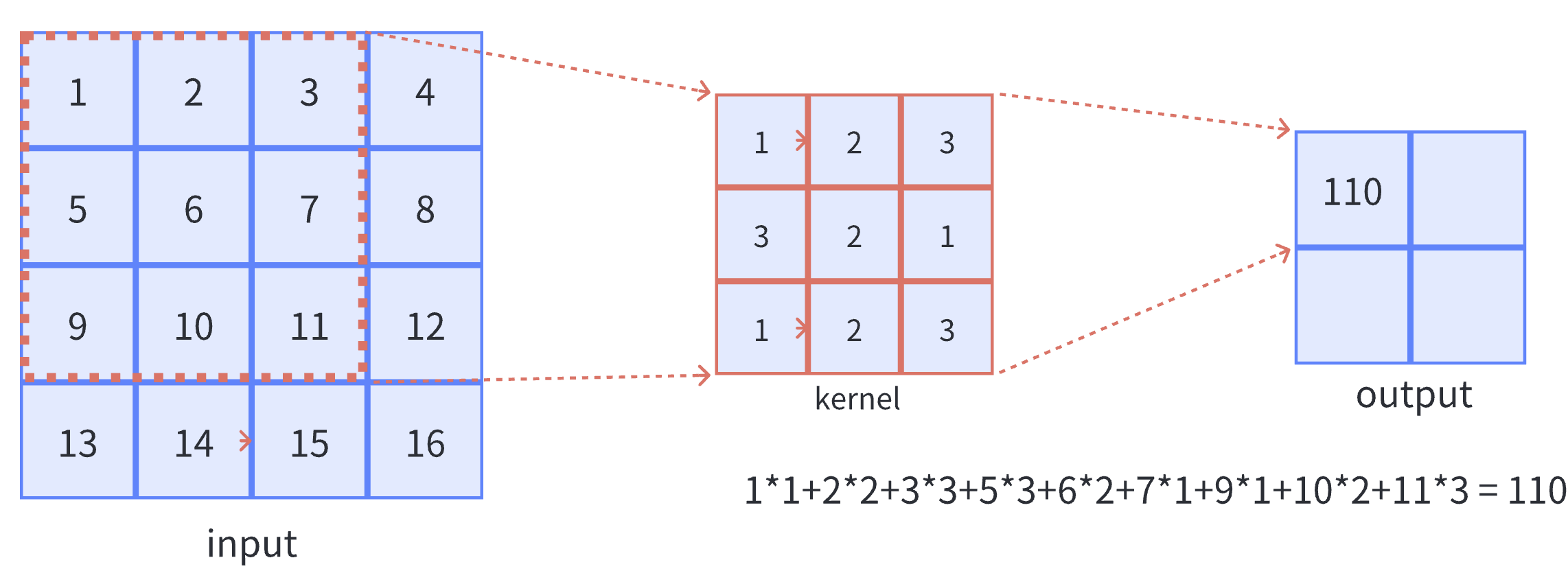
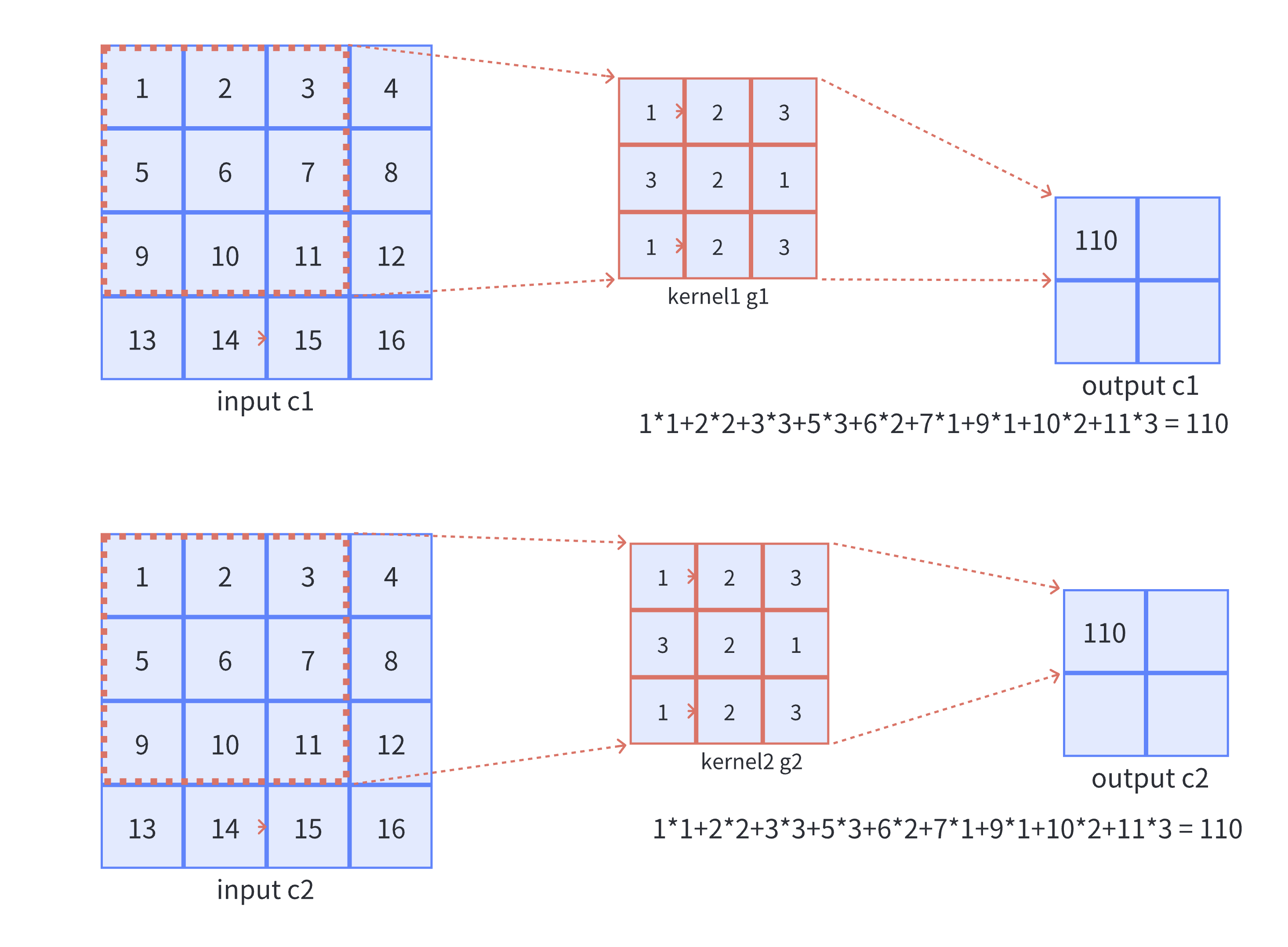
  • 二维卷积计算过程直观展示如下图,卷积核以滑动窗口的形式,从输入中划过,计算点积并求和,得到卷积后的输出存于output中。

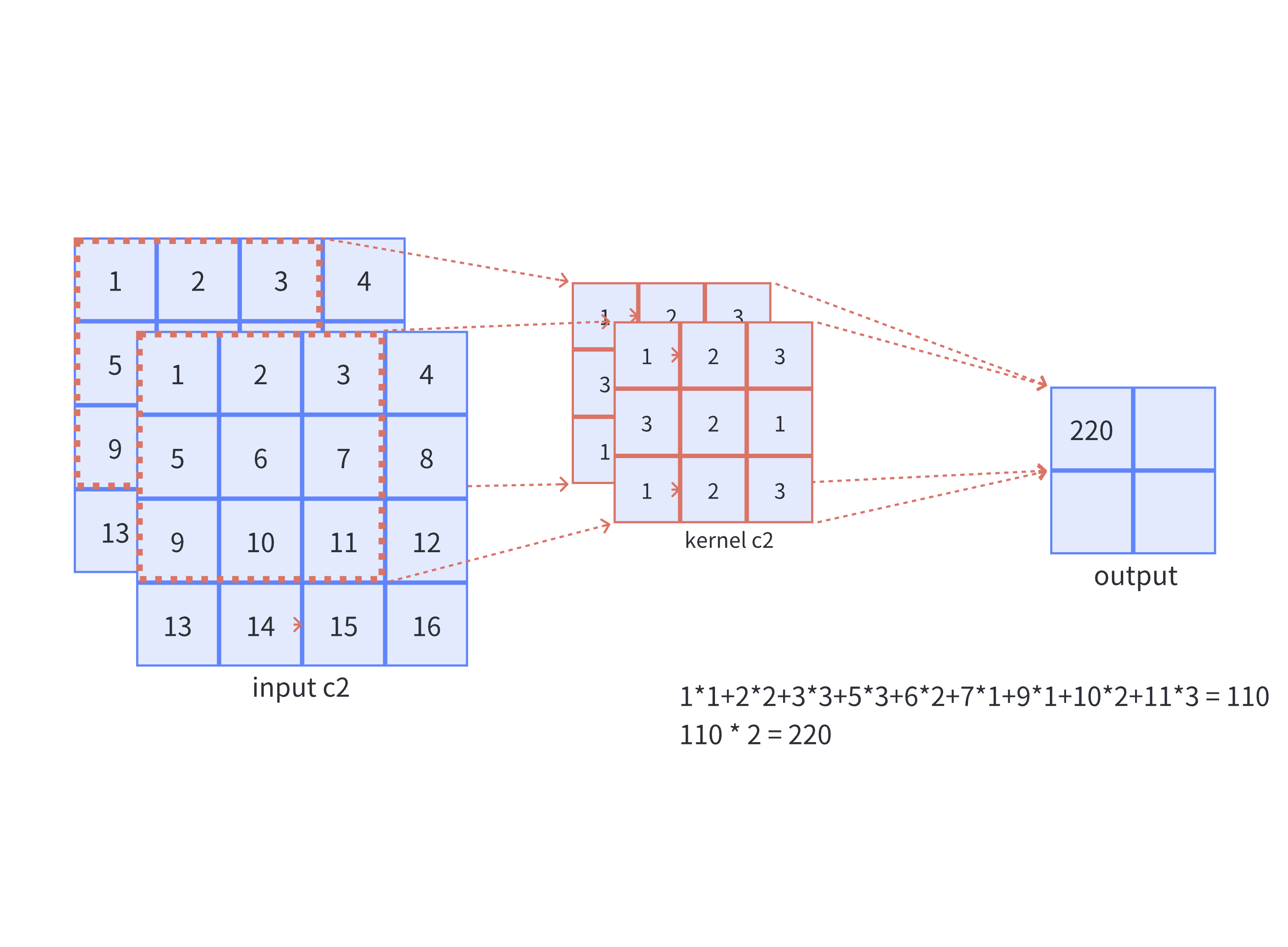
  • 单通道可以直观地被拓展成多通道,只需对多个单通道的卷积结果求和即可(请注意,下图中的kernel属于同一个卷积核中的不同通道),此时需要注意的是输入的通道数与卷积核的通道数需要保持一致。

    如下图所示,可以看到一个多通道的输入和一个多通道的卷积核进行卷积计算,最后得到了一个单通道的输出output. 输入张量的通道数需要和卷积核的通道数个数相同,这里都是2个通道

    input第一个通道和kernel第一个通道 对应位置内求卷积

    input第二个通道和kernel第二个通道对应位置内求卷积

    两者相加,得到对应位置的输出

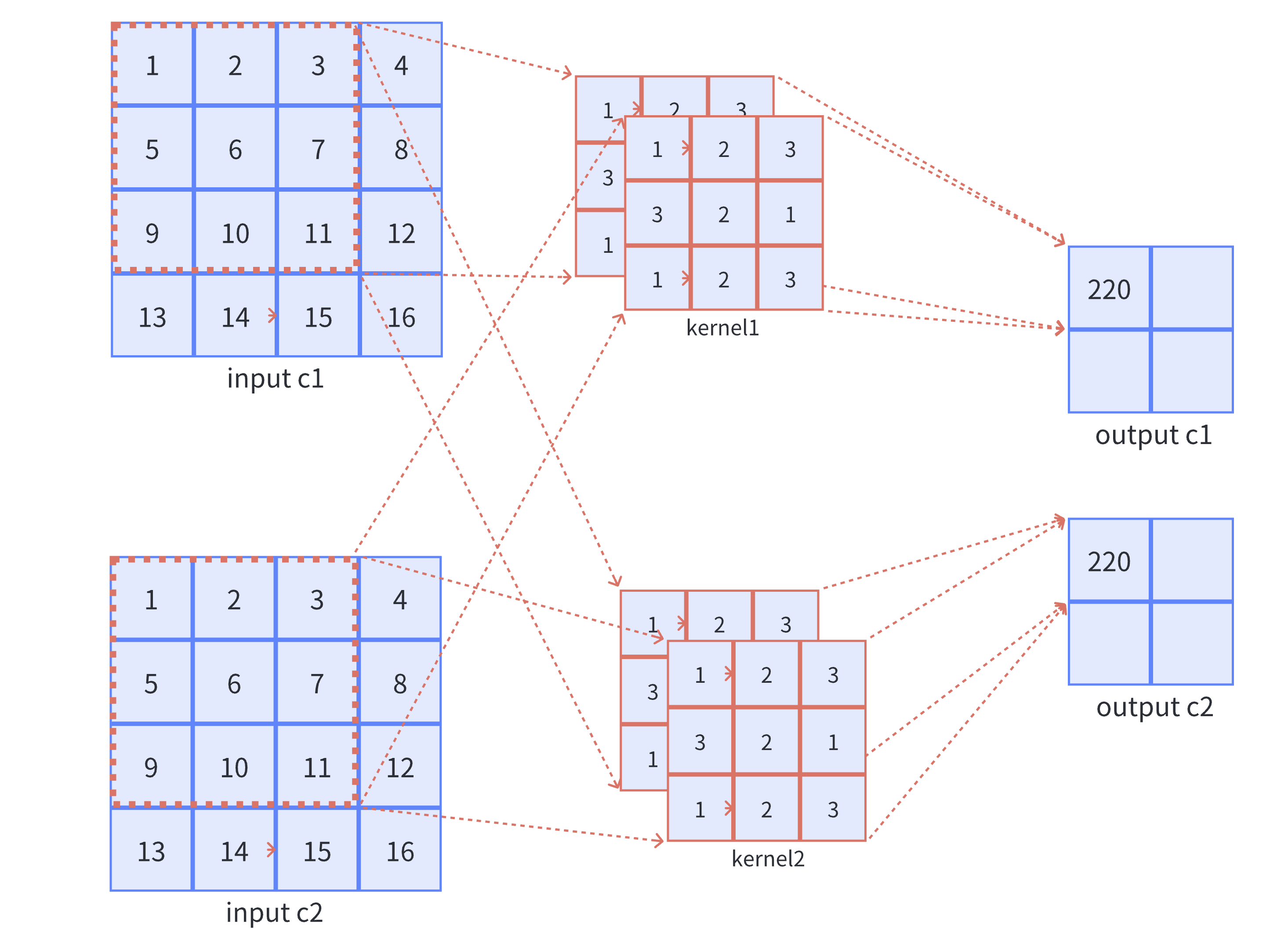
  • 对于单通道输出,只需要一个卷积核就可以完成,如果想要使得输出为多通道,则需使用多个不同的卷积核,即卷积核个数对应输出通道个数

    如下图所示,可以看到,如果使用两个卷积核,最后会产生一个多通道的输出output,它有两个通道,分别为c1c2.

    有一个输入,输入的通道数为2

    取出input_channel = 1的输入通道,它需要分别和卷积核1的通道1做卷积,和卷积核2的通道1做卷积,再把二者相加。

    取出输入的第一个通道input c1

    取出input_channel=2,输入第二个通道,它需要和卷积核1的通道2做卷积,和卷积核2的通道2做卷积,再把二者相加。

  • 组卷积(group conv),顾名思义就是将卷积分组,即在深度上进行分组,假设group=2,则表示将原有的输入数据分成2组,如上图图所示,原本一个卷积核管全部通道,当分组之后,一个卷积核只需要管$\frac{input,channel}{group} = 2 / 2 = 1$个通道,即如下图所示。

  • 分组卷积早在AlexNet便得到了应用,Alex认为组卷积能够增加 卷积核之间的对角相关性,并减少训练参数,不容易过拟合,达到类似正则的效果。从下图可以看出,如果对一个多通道的输入运用组卷积,最后得到了一个多通道的输出output, 它有两个通道,分别为c1c2.

总结:以上是二维卷积的基本定义,二维卷积的直观解释。普通卷积核的通道数需要与输入数据的通道数保持一致,而卷积核的数量则代表了输出数据的通道数。分组卷积核的通道数为输入数据通道数/分组数在卷积计算中,输入输出大小的维度有以下的对应关系:
$$
output, size = floor(\frac{input,size+ 2\times padding-kernel ,size}{stride }+1)
$$

上图例子中:output size = ((4+2*0-3)/1+1) = 2

Expression Layer

表达式的定义

PNNX中的表达式就是一个二元的计算过程,类似如下:

1
2
output_mid = input1 + input2;
output = output_mid * input3;

PNNX的表达式层(Expression Layer)中,提供了一种计算表达式,该表达式能够在一定程度上折叠计算过程并消除中间变量。例如,在残差结构中的add操作在PNNX中就是一个表达式层。

下面是PNNX中对上述过程的计算表达式表示,其中的@0@1代表之前提到的计算数RuntimeOperand,用于表示计算表达式中的输入节点。

1
mul(@2, add(@0, @1));

尽管这个抽象表达式看起来比较简单,但实际上可能存在更为复杂的情况,例如以下的例子。因此,在这种情况下,需要一个强大而可靠的表达式解析和语法树构建功能。

1
add(add(mul(@0, @1), mul(@2, add(add(add(@0, @2), @3), @4))), @5);

词法解析

词法的定义

词法解析的目的是将**add(@0, mul(@1, @2))**拆分为多个Token,拆分后的Token依次为:

  1. Identifier: add
  2. Left bracket: (
  3. Input number: @0
  4. Comma: ,
  5. Identifier: mul
  6. Left bracket: (
  7. Input number: @1
  8. Comma: ,
  9. Input number: @2
  10. Right bracket: )

Token的类型定义如下:

1
2
3
4
5
6
7
8
9
enum class TokenType {
TokenUnknown = -9,
TokenInputNumber = -8,
TokenComma = -7,
TokenAdd = -6,
TokenMul = -5,
TokenLeftBracket = -4,
TokenRightBracket = -3,
};

Token的定义如下,包括以下变量:

  1. Token类型,包括add(加法),mul(乘法),bracket(左右括号)等;
  2. Token在原句子中的开始和结束位置,即start_posend_pos

对于表达式**add(@0, mul(@1, @2))**,可以将它切分为多个Token,其中Token(add)的start_pos为0,end_pos为3。Token(left bracket)的start_pos为3,end_pos为4。Token(@0)的start_pos为4,end_pos为5,以此类推。

1
2
3
4
5
6
7
8
9
10
// 词语Token
struct Token {
TokenType token_type = TokenType::TokenUnknown;
int32_t start_pos = 0; // 词语开始的位置
int32_t end_pos = 0; // 词语结束的位置
Token(TokenType token_type, int32_t start_pos, int32_t end_pos)
: token_type(token_type), start_pos(start_pos), end_pos(end_pos) {

}
};

最后,在词法解析结束后,需要将这些 Token(词语)按照它们的出现顺序和层级关系组成一棵语法树。

1
2
3
4
5
6
7
8
9
// 语法树的节点
struct TokenNode {
int32_t num_index = -1;
std::shared_ptr<TokenNode> left = nullptr; // 语法树的左节点
std::shared_ptr<TokenNode> right = nullptr; // 语法树的右节点
TokenNode(int32_t num_index, std::shared_ptr<TokenNode> left,
std::shared_ptr<TokenNode> right);
TokenNode() = default;
};

词法的解析

判断句子是否为空
1
CHECK(!statement_.empty()) << "The input statement is empty!";
移除句子中的空格
1
2
3
4
statement_.erase(std::remove_if(statement_.begin(), statement_.end(),
[](char c) { return std::isspace(c); }),
statement_.end());
CHECK(!statement_.empty()) << "The input statement is empty!";

如果表达式层中有表达式为add(@0, @1),删除其中的空格后就会得到新的表达式add(@0,@1)

逐个解析句子的字符
1
2
3
4
5
6
7
8
9
10
11
12
13
14
15
16
17
for (int32_t i = 0; i < statement_.size();) {
char c = statement_.at(i);
if (c == 'a') {
CHECK(i + 1 < statement_.size() && statement_.at(i + 1) == 'd')
<< "Parse add token failed, illegal character: "
<< statement_.at(i + 1);
CHECK(i + 2 < statement_.size() && statement_.at(i + 2) == 'd')
<< "Parse add token failed, illegal character: "
<< statement_.at(i + 2);
Token token(TokenType::TokenAdd, i, i + 3);
tokens_.push_back(token);
std::string token_operation =
std::string(statement_.begin() + i, statement_.begin() + i + 3);
token_strs_.push_back(token_operation);
i = i + 3;
}
}

假设字符 c 表示当前的字符。如果 c 等于字符 ‘a’,根据的词法规定,Token 中以 ‘a’ 开头的情况只有 add。因此,需要判断接下来的两个字符是否分别是 ‘d’ 和 ‘d’。如果不是,则报错。如果是的话,则初始化一个新的 Token,并保存其在表达式中的初始和结束位置。

举个例子,如果表达式中的单词以 ‘a’ 开头,那么它只能是 add,而不能是其他词汇表之外的单词,例如 axc 等情况。

1
2
3
4
5
6
7
8
9
10
11
CHECK(i + 1 < statement_.size() && statement_.at(i + 1) == 'd')
<< "Parse add token failed, illegal character: "
<< statement_.at(i + 1);
CHECK(i + 2 < statement_.size() && statement_.at(i + 2) == 'd')
<< "Parse add token failed, illegal character: "
<< statement_.at(i + 2);
Token token(TokenType::TokenAdd, i, i + 3);
tokens_.push_back(token);
std::string token_operation =
std::string(statement_.begin() + i, statement_.begin() + i + 3);
token_strs_.push_back(token_operation);

如果在第一行中,判断第二个字符是否为 ‘d’;若是,在第二行中,判断第三个字符是否也是 ‘d’。如果满足条件,将初始化一个 Token 实例,并保存该单词在句子中的起始位置和结束位置。

同样地,如果某个字符 c 是 ‘m’,需要判断接下来的字符是否是 ‘u’ 和 ‘l’。如果不满足条件,则说明的表达式中出现了词汇表之外的单词(因为词汇表只允许以 ‘m’ 开头的单词是 “mul”)。如果满足条件,同样会初始化一个 Token 实例,并保存该单词的起始和结束位置,以及 Token 的类型。

1
2
3
4
5
6
7
8
9
10
11
12
13
14
15
16
else if (c == '@') {
CHECK(i + 1 < statement_.size() && std::isdigit(statement_.at(i + 1)))
<< "Parse number token failed, illegal character: " << c;
int32_t j = i + 1;
for (; j < statement_.size(); ++j) {
if (!std::isdigit(statement_.at(j))) {
break;
}
}
Token token(TokenType::TokenInputNumber, i, j);
CHECK(token.start_pos < token.end_pos);
tokens_.push_back(token);
std::string token_input_number = std::string(statement_.begin() + i, statement_.begin() + j);
token_strs_.push_back(token_input_number);
i = j;
}

如果第一个字符是 ‘@’,需要读取 ‘@’ 后面的所有数字,例如对于@31231,需要读取@符号之后的所有数字。如果紧跟在 ‘@’ 后面的字符不是数字,则报错。如果是数字,则将这些数字全部读取并组成一个单词(Token)。

1
2
3
4
5
6
7
8
else if (c == ',') {
Token token(TokenType::TokenComma, i, i + 1);
tokens_.push_back(token);
std::string token_comma =
std::string(statement_.begin() + i, statement_.begin() + i + 1);
token_strs_.push_back(token_comma);
i += 1;
}

如果第一个字符是’,’逗号,那么直接读取这个字符作为一个新的Token。

最后,在正确解析和创建这些 Token 后,将它们放入名为 tokens 的数组中,以便进行后续处理。

1
tokens_.push_back(token);

语法解析

语法树的定义

1
2
3
4
5
6
7
struct TokenNode {
int32_t num_index = -1;
std::shared_ptr<TokenNode> left = nullptr;
std::shared_ptr<TokenNode> right = nullptr;
TokenNode(int32_t num_index, std::shared_ptr<TokenNode> left, std::shared_ptr<TokenNode> right);
TokenNode() = default;
};

在进行语法分析时,可以根据词法分析得到的 token 数组构建抽象语法树。抽象语法树是一个由二叉树组成的结构,每个节点都存储了操作符号或值,并通过左子节点和右子节点与其他节点连接。

对于表达式 “add (@0, @1)”,当 num_index 等于 1 时,表示计算数为 @0;当 num_index 等于 2 时,表示计算数为 @1。若 num_index 为负数,则说明当前节点是一个计算节点,如 “mul” 或 “add” 等。

以下是一个简单的示例:

1
2
3
   add
/ \
@0 @1

在这个示例中,根节点是 “add”,左子节点是 “@0”,右子节点是 “@1”。这个抽象语法树表示了一个将 “@0” 和 “@1” 进行相加的表达式。

通过将词法分析得到的 token 数组解析并构建抽象语法树,可以进一步对表达式进行语义分析和求值等操作。

递归向下的解析

语法解析的过程是递归向下的,定义在Generate_函数中。

1
2
3
4
5
6
std::shared_ptr<TokenNode> ExpressionParser::Generate_(int32_t &index) {
CHECK(index < this->tokens_.size());
const auto current_token = this->tokens_.at(index);
CHECK(current_token.token_type == TokenType::TokenInputNumber
|| current_token.token_type == TokenType::TokenAdd || current_token.token_type == TokenType::TokenMul);
}

这个函数处理的对象是词法解析的Token(单词)数组,因为Generate_是一个递归函数,所以index参数指向Token数组中的当前处理位置.

current_token表示当前被处理的Token,它作为当前递归层的第一个Token,必须是以下类型之一。

1
2
3
TokenInputNumber = 0,
TokenAdd = 2,
TokenMul = 3,

如果当前Token的类型是输入数字类型,那么会直接返回一个操作数Token作为叶子节点,不再进行下一层递归(如下)。例如,在表达式add(@0, @1)中的@0和@1被归类为输入数字类型的Token,在解析到这两个Token时会直接创建并返回语法树节点TokenNode

1
2
3
4
5
6
7
8
9
10
if (current_token.token_type == TokenType::TokenInputNumber) {
uint32_t start_pos = current_token.start_pos + 1;
uint32_t end_pos = current_token.end_pos;
CHECK(end_pos > start_pos);
CHECK(end_pos <= this->statement_.length());
const std::string &str_number =
std::string(this->statement_.begin() + start_pos, this->statement_.begin() + end_pos);
return std::make_shared<TokenNode>(std::stoi(str_number), nullptr, nullptr);

}

如果当前Token的类型是mul或者add,需要进行下一层递归来构建对应的左子节点和右子节点。

例如,在处理add(@1,@2)时,遇到add token之后,如下的第一行代码,需要做以下的两步:

  1. 首先判断是否存在左括号(left bracket)
  2. 然后继续向下递归以获取@1,如下的第14行到17行代码,但由于@1代表的是数字类型,递归后立即返回,如以上代码块中第一行对数字类型Token的处理。
1
2
3
4
5
6
7
8
9
10
11
12
13
14
15
16
17
18
19
20
21
else if (current_token.token_type == TokenType::TokenMul || current_token.token_type == TokenType::TokenAdd) {
std::shared_ptr<TokenNode> current_node = std::make_shared<TokenNode>();
current_node->num_index = -int(current_token.token_type);

index += 1;
CHECK(index < this->tokens_.size());
// 判断add之后是否有( left bracket
CHECK(this->tokens_.at(index).token_type == TokenType::TokenLeftBracket);

index += 1;
CHECK(index < this->tokens_.size());
const auto left_token = this->tokens_.at(index);
// 判断当前需要处理的left token是不是合法类型
if (left_token.token_type == TokenType::TokenInputNumber
|| left_token.token_type == TokenType::TokenAdd || left_token.token_type == TokenType::TokenMul) {
// (之后进行向下递归得到@0
current_node->left = Generate_(index);
} else {
LOG(FATAL) << "Unknown token type: " << int(left_token.token_type);
}
}

在第17行当左子树递归构建完毕后,将它赋值到add节点的左子树上。对于表达式add(@0, @1),将左子树连接到current_nodeleft指针中,随后开始构建右子树。

1
2
graph TB;
1((add))-->2((ant 0))
1
2
3
4
5
6
7
8
9
10
11
12
13
14
15
16
17
18
19
20
21
index += 1; 
// 当前的index指向add(@1,@2)中的逗号
CHECK(index < this->tokens_.size());
// 判断是否是逗号
CHECK(this->tokens_.at(index).token_type == TokenType::TokenComma);

index += 1;
CHECK(index < this->tokens_.size());
// current_node->right = Generate_(index);构建右子树
const auto right_token = this->tokens_.at(index);
if (right_token.token_type == TokenType::TokenInputNumber
|| right_token.token_type == TokenType::TokenAdd || right_token.token_type == TokenType::TokenMul) {
current_node->right = Generate_(index);
} else {
LOG(FATAL) << "Unknown token type: " << int(left_token.token_type);
}

index += 1;
CHECK(index < this->tokens_.size());
CHECK(this->tokens_.at(index).token_type == TokenType::TokenRightBracket);
return current_node;

随后需要判断@0之后是否存在comma token,如上代码中的第五行。在构建右子树的过程中,对于表达式add(@1,@2),当index指向逗号的位置时,首先需要判断是否存在逗号。接下来,开始构建右子树,在右子树的向下递归分析中,会得到@2作为一个叶子节点。

当右子树构建完成后,将该节点(即Generate_返回的TokenNode,此处为一个叶子节点,其数据为@1)放置于current_noderight指针中。

1
2
3
4
graph TB;
1((add))-->2((ant 0))

1((add))-->3((ant 1))

对语法树的转换

逆波兰式

来以一个简单的例子来说明,对于计算式add(@0,@1),首先遇到的节点是add,但在遇到add时缺少进行计算所需的具体数据@0@1

因此,需要进行逆波兰转换,将操作数放在前面,计算放在后面。该转换的实现非常简单,只需对原有的二叉树进行后续遍历即可:

1
2
3
4
5
6
7
8
void ReversePolish(const std::shared_ptr<TokenNode> &root_node,
std::vector<std::shared_ptr<TokenNode>> &reverse_polish) {
if (root_node != nullptr) {
ReversePolish(root_node->left, reverse_polish);
ReversePolish(root_node->right, reverse_polish);
reverse_polish.push_back(root_node);
}
}

逆波兰式化后的表达如下:

对于 add (@0,@1),逆波兰式为:@0,@1,add

对于 add(mul(@0,@1),@2),逆波兰式为:@0,@1,mul,@2,add

通过逆波兰转换,可以将原式转换为计算式的输入数放在前面,操作符号放在后面的形式。逆波兰式的特点是消除了括号的需求,使得计算顺序更加清晰和直观。

过程总述

经过这样的转换,可以确保在每次遇到计算节点时所需的操作数已经准备就绪。

  1. 首先,传入一个表达式字符串,例如add(mul(@0,@1),@2)
  2. 接下来,对add(mul(@0,@1),@2)进行词法分析,将其拆分为多个tokens,在拆分过程中需要进行词法校验。
  3. 然后,根据已知的tokens数组,通过递归向下遍历进行语法分析,从而得到相应的计算二叉树。计算二叉树的各个节点可以是add、mul或者@0、@1等。
  4. 最后,对计算二叉树进行逆波兰变换,得到的逆波兰式如下:@0,@1,mul,@2,add。

ResNet & YOLOv5 Infer

TODO

homework

course1

1
2
3
4
5
6
7
8
9
10
11
12
13
// axby.cpp
void Axby(const arma::fmat &x, const arma::fmat &w, const arma::fmat &b,
arma::fmat &y) {
// 把代码写这里 完成y = w * x + b的运算
y = w * x + b;
}

void EPowerMinus(const arma::fmat &x, arma::fmat &y) {
// 把代码写这里 完成y = e^{-x}的运算
arma::fmat eMat(x.n_rows, x.n_cols);
eMat.fill(std::exp(1.0));
y = arma::pow(eMat, -x);
}

course2

  1. Tensor::Flatten
  2. Tensor::Padding
1
2
3
4
5
6
7
8
9
10
11
12
13
14
15
16
17
18
19
20
21
22
23
24
25
26
27
28
29
30
31
32
33
34
35
36
37
38
39
40
41
42
43
44
45
46
47
48
49
50
51
52
// tensor.cpp
void Tensor<float>::Flatten(bool row_major) {
const std::vector<uint32_t> flatten_size = {this->size()};
this->Reshape(flatten_size, row_major);
}

void Tensor<float>::Padding(const std::vector<uint32_t>& pads,
float padding_value) {
CHECK(!this->data_.empty());
CHECK_EQ(pads.size(), 4);
// 四周填充的维度
uint32_t pad_rows1 = pads.at(0); // up
uint32_t pad_rows2 = pads.at(1); // bottom
uint32_t pad_cols1 = pads.at(2); // left
uint32_t pad_cols2 = pads.at(3); // right

const uint32_t rows = this->rows();
const uint32_t cols = this->cols();
const uint32_t channels = this->data_.n_slices;
const uint32_t new_rows = rows + pad_rows1 + pad_rows2;
const uint32_t new_cols = cols + pad_cols1 + pad_cols2;

arma::fcube new_data = arma::fcube(new_rows, new_cols, channels);
new_data.fill(padding_value);

// 方式一:通过循环逐个赋值填充(记录开始时间,精确到纳秒)
auto start_loop = std::chrono::high_resolution_clock::now();
for (uint32_t c = 0; c < channels; ++c) {
for (uint32_t i = 0; i < rows; ++i) {
for (uint32_t j = 0; j < cols; ++j) {
new_data.at(i + pad_rows1, j + pad_cols1, c) = this->data_.at(i, j, c);
}
}
}
auto end_loop = std::chrono::high_resolution_clock::now();
auto duration_loop = std::chrono::duration_cast<std::chrono::nanoseconds>(end_loop - start_loop).count();
std::cout << "Time taken by loop-based padding (in nanoseconds): " << duration_loop << " ns" << std::endl;

// 重置new_data,重新填充初始值,为方式二做准备
new_data.fill(padding_value);

// 方式二:使用subcube赋值填充(记录开始时间,精确到纳秒)
auto start_subcube = std::chrono::high_resolution_clock::now();
new_data.subcube(pad_rows1, pad_cols1, 0, new_rows - pad_rows2 - 1,
new_cols - pad_cols2 - 1, channels - 1) = this->data_;
auto end_subcube = std::chrono::high_resolution_clock::now();
auto duration_subcube = std::chrono::duration_cast<std::chrono::nanoseconds>(end_subcube - start_subcube).count();
std::cout << "Time taken by subcube-based padding (in nanoseconds): " << duration_subcube << " ns" << std::endl;

this->data_ = std::move(new_data);
this->raw_shapes_ = std::vector<uint32_t>{channels, new_rows, new_cols};
}

course3

  1. RuntimeGraph::InitGraphParams
1
2
3
4
5
6
7
8
9
10
11
12
13
14
15
16
17
18
19
20
21
22
23
24
25
26
27
28
29
30
31
32
33
34
35
36
37
38
39
40
41
42
43
44
45
46
47
48
49
50
51
52
53
54
55
56
57
58
59
60
61
62
63
64
65
66
67
68
69
// runtime_ir.cpp
void RuntimeGraph::InitGraphParams(
const std::map<std::string, pnnx::Parameter> &params,
const std::shared_ptr<RuntimeOperator> &runtime_operator) {
for (const auto &[name, parameter]: params) {
const int type = parameter.type;
switch (type) {
case int(RuntimeParameterType::kParameterUnknown): {
RuntimeParameter *runtime_parameter = new RuntimeParameter;
runtime_operator->params.insert({name, runtime_parameter});
break;
}

case int(RuntimeParameterType::kParameterBool): {
RuntimeParameterBool *runtime_parameter = new RuntimeParameterBool;
runtime_parameter->value = parameter.b;
runtime_operator->params.insert({name, runtime_parameter});
break;
}

case int(RuntimeParameterType::kParameterInt): {
RuntimeParameterInt *runtime_parameter = new RuntimeParameterInt;
runtime_parameter->value = parameter.i;
runtime_operator->params.insert({name, runtime_parameter});
break;
}

case int(RuntimeParameterType::kParameterFloat): {
RuntimeParameterFloat *runtime_parameter = new RuntimeParameterFloat;
runtime_parameter->value = parameter.f;
runtime_operator->params.insert({name, runtime_parameter});
break;
}

case int(RuntimeParameterType::kParameterString): {
RuntimeParameterString *runtime_parameter = new RuntimeParameterString;
runtime_parameter->value = parameter.s;
runtime_operator->params.insert({name, runtime_parameter});
break;
}

case int(RuntimeParameterType::kParameterIntArray): {
RuntimeParameterIntArray *runtime_parameter =
new RuntimeParameterIntArray;
runtime_parameter->value = parameter.ai;
runtime_operator->params.insert({name, runtime_parameter});
break;
}

case int(RuntimeParameterType::kParameterFloatArray): {
RuntimeParameterFloatArray *runtime_parameter =
new RuntimeParameterFloatArray;
runtime_parameter->value = parameter.af;
runtime_operator->params.insert({name, runtime_parameter});
break;
}
case int(RuntimeParameterType::kParameterStringArray): {
RuntimeParameterStringArray *runtime_parameter =
new RuntimeParameterStringArray;
runtime_parameter->value = parameter.as;
runtime_operator->params.insert({name, runtime_parameter});
break;
}
default: {
LOG(FATAL) << "Unknown parameter type: " << type;
}
}
}
}

course4

  1. TopoSort
1
2
// runtime_ir.hpp
void KahnTopoSort();
1
2
3
4
5
6
7
8
9
10
11
12
13
14
15
16
17
18
19
20
21
22
23
24
25
26
27
28
29
30
31
32
33
34
35
36
37
38
39
40
41
42
43
44
45
// runtime_ir.cpp
void RuntimeGraph::KahnTopoSort() {
std::unordered_map<std::shared_ptr<RuntimeOperator>, int> in_degree;
std::queue<std::shared_ptr<RuntimeOperator>> zero_in_degree_queue;

// 计算所有节点的入度
for (const auto& op : operators_) {
in_degree[op] = 0;
}
for (const auto& op : operators_) {
for (const auto& [_, next_op] : op->output_operators) {
if (next_op != nullptr) {
in_degree[next_op]++;
}
}
}

// 找到所有入度为0的节点
for (const auto& [op, degree] : in_degree) {
if (degree == 0) {
zero_in_degree_queue.push(op);
}
}

// 处理队列中的节点
while (!zero_in_degree_queue.empty()) {
auto op = zero_in_degree_queue.front();
zero_in_degree_queue.pop();
topo_operators_.push_back(op);

for (const auto& [_, next_op] : op->output_operators) {
if (next_op != nullptr) {
in_degree[next_op]--;
if (in_degree[next_op] == 0) {
zero_in_degree_queue.push(next_op);
}
}
}
}

// 检查是否存在环
if (topo_operators_.size() != operators_.size()) {
throw std::runtime_error("Graph has a cycle");
}
}

course5

  1. Sigmoid Layer
1
2
3
4
5
6
7
8
9
10
11
12
13
14
15
16
17
18
// sigmoid.hpp
#ifndef KUIPER_INFER_SOURCE_LAYER_BINOCULAR_SIGMOID_HPP_
#define KUIPER_INFER_SOURCE_LAYER_BINOCULAR_SIGMOID_HPP_
#include "layer/abstract/non_param_layer.hpp"

namespace kuiper_infer {
class SigmoidLayer : public NonParamLayer {
public:
SigmoidLayer() : NonParamLayer("Sigmoid") {}
InferStatus Forward(
const std::vector<std::shared_ptr<Tensor<float>>>& inputs,
std::vector<std::shared_ptr<Tensor<float>>>& outputs) override;
static ParseParameterAttrStatus GetInstance(
const std::shared_ptr<RuntimeOperator>& op,
std::shared_ptr<Layer>& sigmoid_layer);
};
} // namespace kuiper_infer
#endif // KUIPER_INFER_SOURCE_LAYER_BINOCULAR_SIGMOID_HPP_
1
2
3
4
5
6
7
8
9
10
11
12
13
14
15
16
17
18
19
20
21
22
23
24
25
26
27
28
29
30
31
32
33
34
35
36
37
38
39
40
41
42
43
44
45
46
47
48
49
50
51
52
53
54
55
56
57
58
59
60
61
62
63
64
65
66
67
68
69
70
71
72
73
// sigmoid.cpp
#include "sigmoid.hpp"
#include "layer/abstract/layer_factory.hpp"

namespace kuiper_infer {
InferStatus SigmoidLayer::Forward(
const std::vector<std::shared_ptr<Tensor<float>>> &inputs,
std::vector<std::shared_ptr<Tensor<float>>> &outputs) {
if (inputs.empty()) {
LOG(ERROR) << "The input tensor array in the relu layer is empty";
return InferStatus::kInferFailedInputEmpty;
}
if (inputs.size() != outputs.size()) {
LOG(ERROR) << "The input and output tensor array size of the relu layer do "
"not match";
return InferStatus::kInferFailedInputOutSizeMatchError;
}

const uint32_t batch_size = inputs.size();
for (uint32_t i = 0; i < batch_size; ++i) {
const sftensor &input_data = inputs.at(i);
const sftensor &output_data = outputs.at(i);
if (input_data == nullptr || input_data->empty()) {
LOG(ERROR)
<< "The input tensor array in the relu layer has an empty tensor "
<< i << " th";
return InferStatus::kInferFailedInputEmpty;
}
if (output_data != nullptr && !output_data->empty()) {
if (input_data->shapes() != output_data->shapes()) {
LOG(ERROR) << "The input and output tensor shapes of the relu "
"layer do not match "
<< i << " th";
return InferStatus::kInferFailedInputOutSizeMatchError;
}
}
}

for (uint32_t i = 0; i < batch_size; ++i) {
const std::shared_ptr<Tensor<float>> &input = inputs.at(i);
CHECK(input == nullptr || !input->empty())
<< "The input tensor array in the relu layer has an empty tensor " << i
<< " th";

std::shared_ptr<Tensor<float>> output = outputs.at(i);
if (output == nullptr || output->empty()) {
DLOG(ERROR)
<< "The output tensor array in the relu layer has an empty tensor "
<< i << " th";
output = std::make_shared<Tensor<float>>(input->shapes());
outputs.at(i) = output;
}
CHECK(output->shapes() == input->shapes())
<< "The input and output tensor shapes of the relu layer do not match "
<< i << " th";
for (uint32_t j = 0; j < input->size(); ++j) {
float value = input->index(j);
output->index(j) = 1.f / (1.f + expf(-value));
}
}
return InferStatus::kInferSuccess;
}

ParseParameterAttrStatus SigmoidLayer::GetInstance(
const std::shared_ptr<RuntimeOperator> &op,
std::shared_ptr<Layer> &sigmoid_layer) {
CHECK(op != nullptr) << "Sigmod layer op is nullptr";
sigmoid_layer = std::make_shared<SigmoidLayer>();
return ParseParameterAttrStatus::kParameterAttrParseSuccess;
}

LayerRegistererWrapper kSigmoidGetInstance("nn.Sigmoid", SigmoidLayer::GetInstance);
} // namespace kuiper_infer

course6

  1. create_layer_group_convforward
1
2
3
4
5
6
7
8
9
10
11
12
13
14
15
16
17
18
19
20
21
22
23
24
25
26
27
28
29
30
31
32
33
34
35
36
37
38
39
40
41
42
// test_conv.cpp
TEST(test_registry, create_layer_group_convforward) {
const uint32_t batch_size = 1;
std::vector<sftensor> inputs(batch_size);
std::vector<sftensor> outputs(batch_size);

const uint32_t in_channel = 2;
for (uint32_t i = 0; i < batch_size; ++i) {
sftensor input = std::make_shared<ftensor>(in_channel, 4, 4);
input->data().slice(0) = "1,2,3,4;"
"5,6,7,8;"
"9,10,11,12;"
"13,14,15,16;";

input->data().slice(1) = "1,2,3,4;"
"5,6,7,8;"
"9,10,11,12;"
"13,14,15,16;";
inputs.at(i) = input;
}
const uint32_t kernel_h = 3;
const uint32_t kernel_w = 3;
const uint32_t stride_h = 1;
const uint32_t stride_w = 1;
const uint32_t kernel_count = 2;
const uint32_t group = 2;
std::vector<sftensor> weights;
for (uint32_t i = 0; i < kernel_count; ++i) {
sftensor kernel = std::make_shared<ftensor>(in_channel / group, kernel_h, kernel_w);
for (uint32_t j = 0; j < (in_channel / group); ++j) {
kernel->data().slice(j) = arma::fmat("1,2,3;"
"3,2,1;"
"1,2,3;");
}
weights.push_back(kernel);
}
ConvolutionLayer conv_layer(kernel_count, in_channel, kernel_h, kernel_w, 0,
0, stride_h, stride_w, group, false);
conv_layer.set_weights(weights);
conv_layer.Forward(inputs, outputs);
outputs.at(0)->Show();
}

course7

  1. 词法和语法解析中支持sin(三角函数)操作
  2. 如果操作符是单输入数,例如问题1中的sin函数,的Forward函数应该做出什么改动能获得正确的计算结果。
1
2
3
4
5
6
7
8
9
10
11
12
13
14
15
16
17
18
19
20
21
22
23
24
// tensor_utils.hpp
/**
* sin(@num)
* @param tensor 输入张量
* @return 张量 sin 的结果
*/
std::shared_ptr<Tensor<float>> TensorElementSin(
const std::shared_ptr<Tensor<float>>& tensor);

// tensor_utils.cpp
std::shared_ptr<Tensor<float>> TensorElementSin(
const std::shared_ptr<Tensor<float>>& tensor) {
CHECK(tensor != nullptr);

sftensor output_tensor = TensorCreate(tensor->shapes());
const auto& input_data = tensor->data();
auto& output_data = output_tensor->data();

for (size_t i = 0; i < input_data.size(); i++) {
output_data[i] = std::sin(input_data[i]);
}

return output_tensor;
}
1
2
3
4
5
6
7
8
9
10
11
12
13
14
15
16
17
18
19
20
21
22
23
24
25
26
27
28
29
30
31
32
33
34
35
36
37
38
39
40
41
42
43
44
45
46
47
48
49
50
51
52
53
54
55
56
57
58
59
60
61
62
63
64
65
66
67
68
69
70
71
72
73
74
75
76
77
78
79
80
81
82
83
84
85
86
87
// parse_expression.cpp
std::shared_ptr<TokenNode> ExpressionParser::Generate_(int32_t &index) { // recursive generate
CHECK(index < this->tokens_.size());
const auto current_token = this->tokens_.at(index);
CHECK(current_token.token_type == TokenType::TokenInputNumber ||
current_token.token_type == TokenType::TokenAdd ||
current_token.token_type == TokenType::TokenMul ||
current_token.token_type == TokenType::TokenSin);
if (current_token.token_type == TokenType::TokenInputNumber) {
uint32_t start_pos = current_token.start_pos + 1;
uint32_t end_pos = current_token.end_pos;
CHECK(end_pos > start_pos || end_pos <= this->statement_.length())
<< "Current token has a wrong length";
const std::string &str_number =
std::string(this->statement_.begin() + start_pos,
this->statement_.begin() + end_pos);
return std::make_shared<TokenNode>(std::stoi(str_number), nullptr, nullptr);

} else if (current_token.token_type == TokenType::TokenMul ||
current_token.token_type == TokenType::TokenAdd) {
std::shared_ptr<TokenNode> current_node = std::make_shared<TokenNode>();
current_node->num_index = int(current_token.token_type);

index += 1;
CHECK(index < this->tokens_.size()) << "Missing left bracket!";
CHECK(this->tokens_.at(index).token_type == TokenType::TokenLeftBracket);

index += 1;
CHECK(index < this->tokens_.size()) << "Missing correspond left token!";
const auto left_token = this->tokens_.at(index);

if (left_token.token_type == TokenType::TokenInputNumber ||
left_token.token_type == TokenType::TokenAdd ||
left_token.token_type == TokenType::TokenMul ||
left_token.token_type == TokenType::TokenSin) {
current_node->left = Generate_(index);
} else {
LOG(FATAL) << "Unknown token type: " << int(left_token.token_type);
}

index += 1;
CHECK(index < this->tokens_.size()) << "Missing comma!";
CHECK(this->tokens_.at(index).token_type == TokenType::TokenComma);

index += 1;
CHECK(index < this->tokens_.size()) << "Missing correspond right token!";
const auto right_token = this->tokens_.at(index);
if (right_token.token_type == TokenType::TokenInputNumber ||
right_token.token_type == TokenType::TokenAdd ||
right_token.token_type == TokenType::TokenMul ||
right_token.token_type == TokenType::TokenSin) {
current_node->right = Generate_(index);
} else {
LOG(FATAL) << "Unknown token type: " << int(right_token.token_type);
}

index += 1;
CHECK(index < this->tokens_.size()) << "Missing right bracket!";
CHECK(this->tokens_.at(index).token_type == TokenType::TokenRightBracket);
return current_node;
} else if (current_token.token_type == TokenType::TokenSin){
std::shared_ptr<TokenNode> current_node = std::make_shared<TokenNode>();
current_node->num_index = int(current_token.token_type);

index += 1;
CHECK(index < this->tokens_.size()) << "Missing left bracket!";
CHECK(this->tokens_.at(index).token_type == TokenType::TokenLeftBracket);

index += 1;
const auto cur_token = this->tokens_.at(index);
if (cur_token.token_type == TokenType::TokenInputNumber ||
cur_token.token_type == TokenType::TokenAdd ||
cur_token.token_type == TokenType::TokenMul ||
cur_token.token_type == TokenType::TokenSin) {
current_node->left = Generate_(index);
} else {
LOG(FATAL) << "Unknown token type: " << int(cur_token.token_type);
}

index += 1;
CHECK(index < this->tokens_.size()) << "Missing right bracket!";
CHECK(this->tokens_.at(index).token_type == TokenType::TokenRightBracket);
return current_node;
} else {
LOG(FATAL) << "Unknown token type: " << int(current_token.token_type);
}
}
1
2
3
4
5
6
7
8
9
10
11
12
13
14
15
16
17
18
19
20
21
22
23
24
25
26
27
28
29
30
31
32
33
34
35
36
37
38
39
40
41
42
43
44
45
46
47
48
49
50
51
52
53
54
55
56
57
58
59
60
61
62
63
64
65
66
67
68
69
70
71
72
73
74
75
76
77
78
79
80
81
82
83
84
85
86
87
88
89
90
91
92
93
94
95
96
97
98
99
100
101
102
103
104
105
106
107
108
109
110
111
112
113
114
115
116
117
118
119
120
121
122
123
124
125
126
127
128
129
// expression.cpp
InferStatus ExpressionLayer::Forward(
const std::vector<std::shared_ptr<Tensor<float>>>& inputs,
std::vector<std::shared_ptr<Tensor<float>>>& outputs) {
if (inputs.empty()) {
LOG(ERROR) << "The input tensor array in the expression layer is empty";
return InferStatus::kInferFailedInputEmpty;
}

if (outputs.empty()) {
LOG(ERROR) << "The output tensor array in the expression layer is empty";
return InferStatus::kInferFailedOutputEmpty;
}

CHECK(this->parser_ != nullptr)
<< "The parser in the expression layer is null!";
this->parser_->Tokenizer(false);
const auto& expressions = this->parser_->tokens();
CHECK(!expressions.empty())
<< "The expression parser failed to parse " << statement_;

for (uint32_t i = 0; i < inputs.size(); ++i) {
const sftensor& input_data = inputs.at(i);
if (input_data == nullptr || input_data->empty()) {
LOG(ERROR) << "The input tensor array in the expression layer has an "
"empty tensor "
<< i << "th";
return InferStatus::kInferFailedInputEmpty;
}
}

const uint32_t batch_size = outputs.size();
for (uint32_t i = 0; i < batch_size; ++i) {
if (outputs.at(i) == nullptr || outputs.at(i)->empty()) {
DLOG(ERROR) << "The output tensor array in the expression layer has an "
"empty tensor "
<< i << "th";
return InferStatus::kInferFailedOutputEmpty;
}
outputs.at(i)->Fill(0.f);
}

std::stack<std::vector<std::shared_ptr<Tensor<float>>>> op_stack;
const std::vector<std::shared_ptr<TokenNode>>& token_nodes =
this->parser_->Generate();
for (const auto& token_node : token_nodes) {
if (token_node->num_index >= 0) {
// process operator
uint32_t start_pos = token_node->num_index * batch_size;
std::vector<std::shared_ptr<Tensor<float>>> input_token_nodes;
for (uint32_t i = 0; i < batch_size; ++i) {
CHECK(i + start_pos < inputs.size())
<< "The " << i
<< "th operand doesn't have appropriate number of tensors";
// fixme 这里的张量拷贝是否有必要
input_token_nodes.push_back(inputs.at(i + start_pos));
}
op_stack.push(input_token_nodes);
} else {
// process operation
const int32_t op = token_node->num_index;
if (op != int(TokenType::TokenAdd) && op != int(TokenType::TokenMul) && op != int(TokenType::TokenSin)) {
LOG(FATAL) << "Unknown operator type: " << op;
}
if (op == int(TokenType::TokenSin)) {
CHECK(op_stack.size() >= 1) << "The number of operand is less than one for sin operation";
std::vector<std::shared_ptr<Tensor<float>>> input_node = op_stack.top();
CHECK(input_node.size() == batch_size)
<< "The operand doesn't have appropriate number of tensors, "
"which need "
<< batch_size;
op_stack.pop();
std::vector<std::shared_ptr<Tensor<float>>> output_token_nodes(batch_size);
for (uint32_t i = 0; i < batch_size; ++i) {
// do execution
output_token_nodes.at(i) = TensorElementSin(input_node.at(i)); // Modified
}
op_stack.push(output_token_nodes);
continue; /// 跳过循环的其余部分进行sin操作
} else {
CHECK(op_stack.size() >= 2) << "The number of operand is less than two";
std::vector<std::shared_ptr<Tensor<float>>> input_node1 = op_stack.top();

CHECK(input_node1.size() == batch_size)
<< "The first operand doesn't have appropriate number of tensors, "
"which need "
<< batch_size;
op_stack.pop();

std::vector<std::shared_ptr<Tensor<float>>> input_node2 = op_stack.top();
CHECK(input_node2.size() == batch_size)
<< "The second operand doesn't have appropriate number of tensors, "
"which need "
<< batch_size;
op_stack.pop();

std::vector<std::shared_ptr<Tensor<float>>> output_token_nodes(
batch_size);
for (uint32_t i = 0; i < batch_size; ++i) {
// do execution
if (op == int(TokenType::TokenAdd)) {
output_token_nodes.at(i) =
TensorElementAdd(input_node1.at(i), input_node2.at(i));
} else if (op == int(TokenType::TokenMul)) {
output_token_nodes.at(i) =
TensorElementMultiply(input_node1.at(i), input_node2.at(i));
} else if (op == int(TokenType::TokenSin)) {
output_token_nodes.at(i) =
TensorElementSin(input_node1.at(i));
} else {
LOG(FATAL) << "Unknown operator type: " << op;
}
}
op_stack.push(output_token_nodes);
}
}
}

CHECK(op_stack.size() == 1)
<< "The expression has more than one output operand!";
std::vector<sftensor> output_node = op_stack.top();
op_stack.pop();
for (int i = 0; i < batch_size; ++i) {
CHECK(outputs.at(i) != nullptr && !outputs.at(i)->empty());
CHECK(outputs.at(i)->shapes() == output_node.at(i)->shapes());
outputs.at(i) = output_node.at(i);
}
return InferStatus::kInferSuccess;
}

github repo: https://github.com/kyrie2to11/NanoServer.git

基础知识

服务器框架

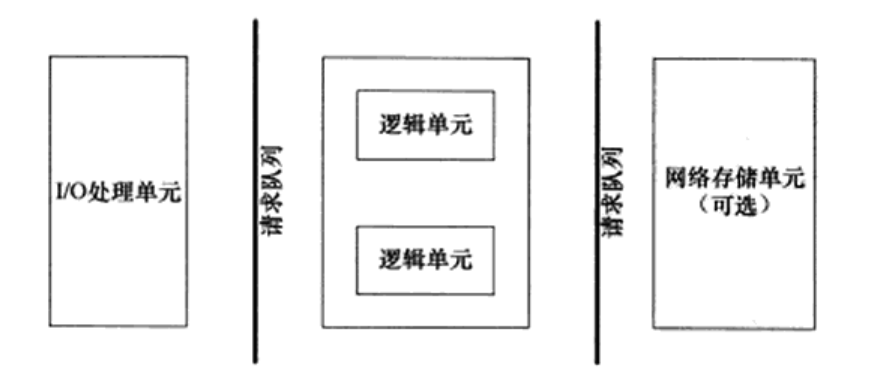
服务器基本框架:I/O 单元 + 逻辑单元 + 网络存储单元 (各个单元间通信方式:请求队列)

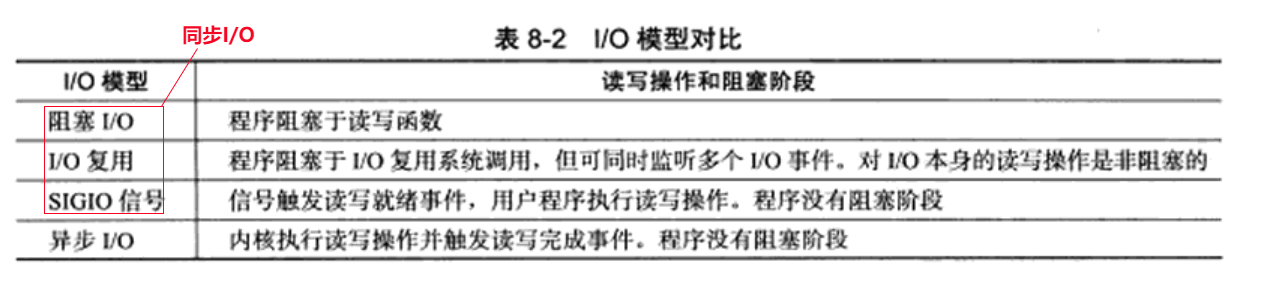
四种 I/O 模型

基础概念:

  1. 同步 I/O:用户代码自行执行 I/O 操作(数据从内核缓冲区读入用户缓冲区或从用户缓冲区写入内核缓冲区),同步 I/O 内核向应用程序通知的是就绪事件
  2. 异步 I/O: 数据在内核缓冲区和用户缓冲区之间的移动是由内核在“后台”完成的,异步 I/O 内核向应用程序通知的是完成事件
  3. 阻塞 I/O:阻塞的文件描述符,针对阻塞 I/O 执行的系统调用可能因为无法立即完成而被操作系统挂起,直到等待的事件发生为止
  4. 非阻塞 I/O:非阻塞的文件描述符,针对非阻塞 I/O 执行的系统调用总是立即返回,而不管事件是否已经发生

两种事件处理模式

服务器程序通常需要处理三类事件: I/O 事件、信号及定时事件

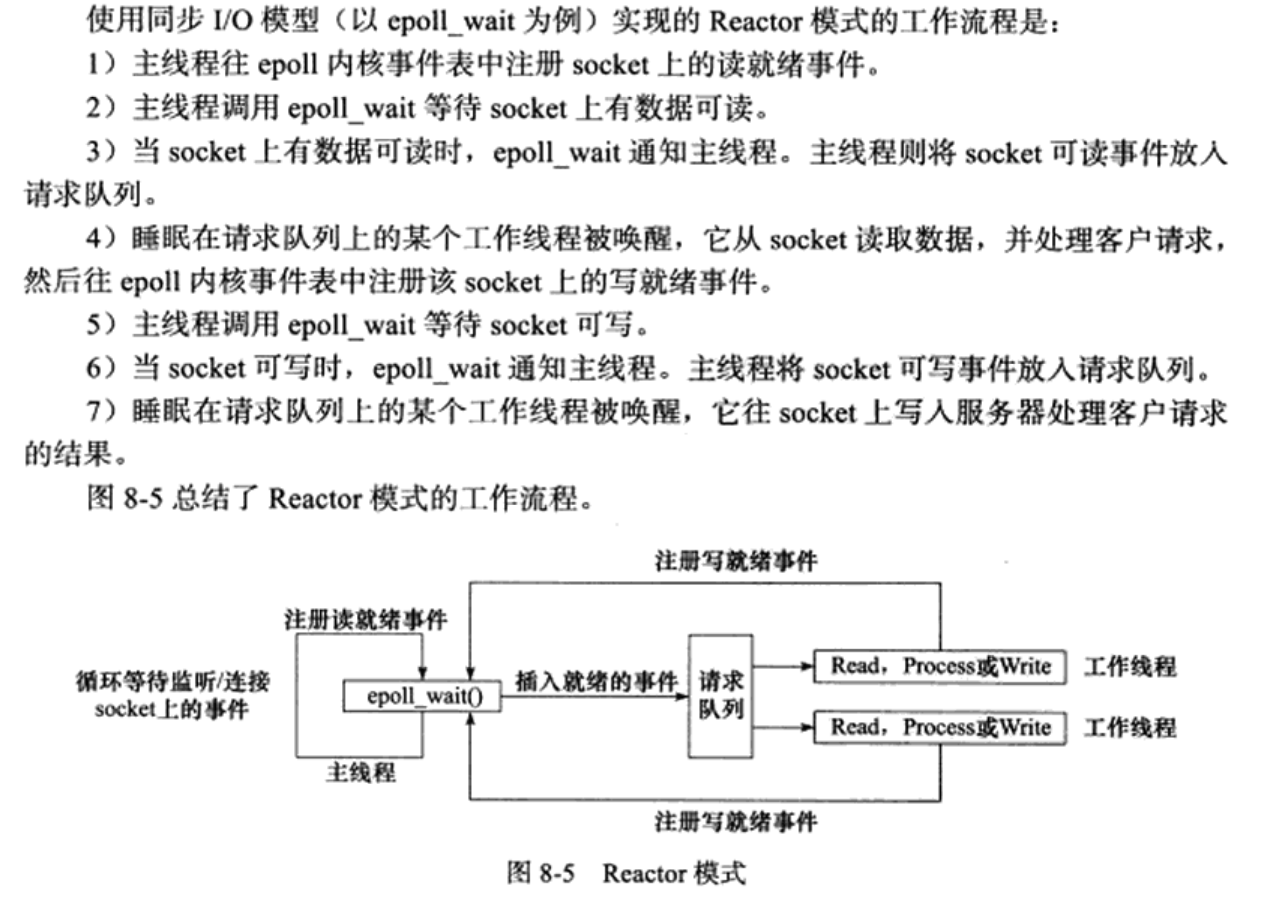
  1. reactor 模式:主线程(I/O处理单元)只负责监听文件描述符上是否有事件发生,有的话立即通知工作线程(逻辑单元),读写数据、接受新连接及处理客户请求均在工作线程中完成。通常由同步 I/O实现。

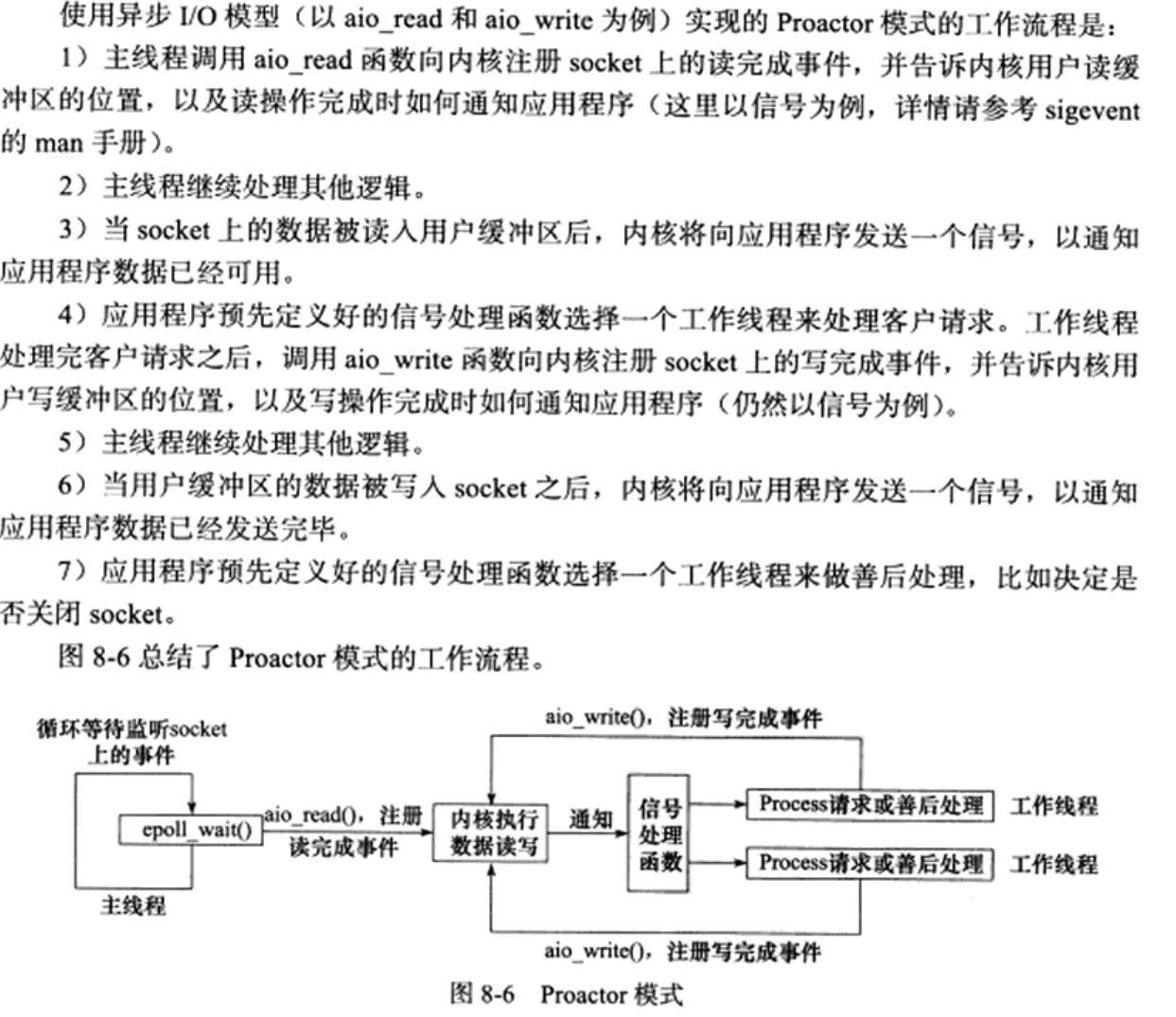
  2. proactor模式:主线程和内核负责处理读写数据、接受新连接等I/O操作,工作线程仅负责业务逻辑,如处理客户请求。通常由异步 I/O实现。

两种并发模式

  1. 半同步/半异步模式
    1. 并发模式中的同步和异步:同步指的是程序完全按照代码序列的顺序执行,异步指的是程序的执行需要由系统事件驱动
    2. I/O 模型中的同步和异步区分的是内核向应用程序通知的是何种 I/O 事件(就绪事件 or 完成事件),以及由谁完成 I/O 读写(应用程序 or 内核)
    3. 半同步/半异步模式中,同步线程用于处理客户逻辑,异步线程用于处理 I/O 事件
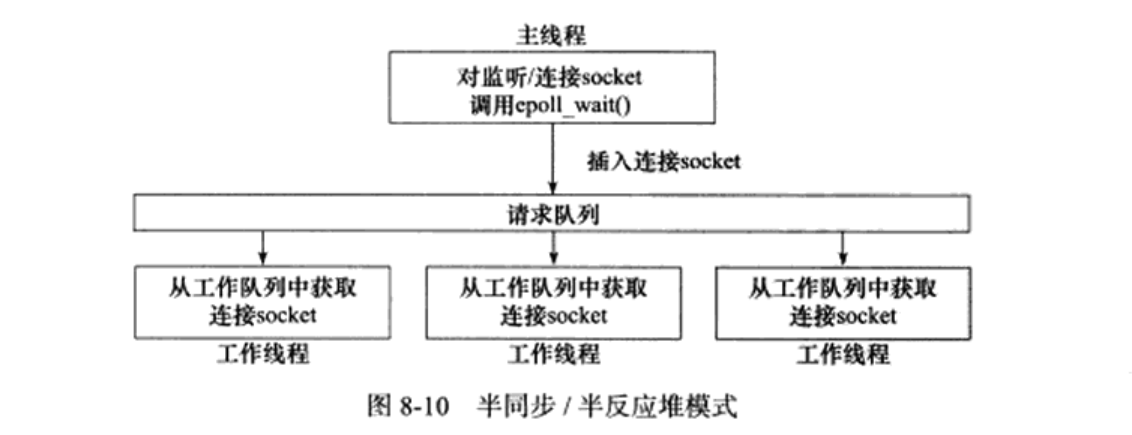
    4. 服务器程序中,综合考虑两种事件处理模式和几种 I/O 模型,则半同步/半异步模式存在多种变体。其中有一种变体称为半同步/半反应堆模式:异步线程只有一个,由主线程充当。同步线程(工作线程)处理客户逻辑。工作模式是 Reactor 模式
  2. 领导者/追随者模式

项目特性

  1. 利用 epoll 与线程池实现 Reactor 高并发模型
  2. 利用状态机与正则实现 HTTP 请求报文解析和 HTTP 响应生成,可处理 GET 和 POST 请求
  3. 用 vector 容器封装 char,实现一个可自动扩容的缓冲区
  4. 基于 epoll_wait 实现定时功能,关闭超时的非活动连接,并用小根堆作为容器管理定时器
  5. 利用单例模式实现了一个简单的线程池,减少了线程创建与销毁的开销
  6. 利用单例模式实现 MySQL 数据库连接池,减少数据库连接建立与关闭的开销,实现了用户注册登录功能
  7. 利用单例模式与阻塞队列实现异步日志系统,记录服务器运行状态
  8. 能够处理前端发送的multi/form-data类型的 POST 请求,实现了文件上传功能
  9. 通过 jsoncpp 生成 json 数据,向前端发送文件列表,实现文件展示与下载

Workflow

  1. git push

    1
    2
    3
    4
    5
    6
    # 添加子模块
    git submodule add https://github.com/open-source-parsers/jsoncpp.git jsoncpp

    git add .
    git commit -m "message"
    git push origin main
  2. git clone & install

    1
    2
    3
    4
    5
    6
    7
    8
    git clone https://github.com/kyrie2to11/NanoServer.git

    # 安装 jsoncpp
    git submodule update --init --recursive
    cd jsoncpp
    cmake -S . -B build
    cd build && make
    sudo make install
    1
    2
    3
    vim ~/.bashrc
    # jsoncpp
    export LD_LIBRARY_PATH=$LD_LIBRARY_PATH:/usr/local/lib
    1
    2
    3
    # 生成 NanoServer 可执行文件 
    cd NanoServer
    make
  3. mysql config

    1
    2
    3
    4
    5
    6
    # 报错:ERROR 2002 (HY000): Can't connect to local MySQL server through socket '/var/run/mysqld/mysqld.sock' (2)
    # mysql 服务重启即可
    service mysql restart

    # mysql 服务关闭
    service mysql stop
    1
    2
    3
    4
    5
    6
    7
    8
    9
    10
    11
    12
    13
    14
    -- 创建数据库
    create database webdb;

    -- 创建user表
    USE webdb;
    CREATE TABLE user(
    username char(50) NULL,
    passwd char(50) NULL
    )ENGINE=InnoDB;

    -- 添加数据
    INSERT INTO user(username, passwd) VALUES('username', 'password');

    -- webdb是数据库名,user是表名,需要在main函数中传入
  4. start server

    1
    2
    3
    4
    5
    6
    7
    8
    tmux
    cd NanoServer
    ./bin/server

    ctrl + b + d # detach session
    tmux attach-session -t 0 # attach session

    # 默认访问端口: 1316 可在 main.cpp 更改

Bug

  1. 运行一段时间后 buffer 报错,暂不清楚原因

    1
    2
    3
    (base) jarvis@zephyrus:~/Projects/webserver/NanoServer$ ./bin/server 
    server: ../src/buffer/buffer.cpp:21: void Buffer::Retrieve(size_t): Assertion 'len <= ReadableBytes()' failed.
    Aborted (core dumped)

致谢

  1. Linux高性能服务器编程,游双著
  2. markparticle/WebServer
  3. Sakura1221/SimpleWebServer
  4. wustghj/SimpleServer

github repo: https://github.com/kyrie2to11/MySQLPool.git

SQL Pool Project 背景

  • 为了提高 MySQL 数据库的访存瓶颈,在大量 SQL connection 并发的情况下,重复的TCP三次握手 -> MySQL Server 连接认证 -> MySQL Server 关闭连接回收资源 -> TCP 四次挥手消耗大量时间,增加连接池可以减少此部分耗时

技术点

  1. MySQL 数据库编程
  2. 单例模式
  3. queue 队列容器
  4. c++11 多线程编程、线程互斥、线程同步通信和 unique_lock
    1. 进程与线程的区别和举例
      • 资源占用
        1. 进程是资源分配的基本单位。每个进程有独立的地址空间、代码段、数据段、堆和栈。如打开一个文本编辑器和浏览器,这是两个不同的进程,资源独立
        2. 线程是进程内的执行单元,共享所属进程的资源。如一个文本编辑器进程中,可能有一个线程负责接收用户键盘输入,另一个线程负责后台保存文档。这些线程共享文本编辑器进程的代码段、数据段等。
      • 调度开销
        1. 进程切换开销大,线程切换开销较小
    2. 进程通信方式
      • 管道(Pipe): 半双工通信(同一时刻单向信息流动),用于具有亲缘关系的进程通信
      • 消息队列(Message Queue): 相较管道克服了管道只能在具有亲缘关系的进程间通信的限制
      • 共享内存(Shared Memory)
      • 信号量(Semaphore): 相较线程通信条件变量区别在于有状态,实际上是一个计数器,可正可负,用于标识共享资源的数目或阻塞的进程数目
    3. 线程通信方式
      • 互斥锁(Mutex)
      • 条件变量(Condition_Variable): 无状态
    4. 条件变量搭配 uniqe_lock 而不能搭配 lock_guard 原因:
      • Condition_Variable cv.wait(mtx) 在等待信号量通知时会先把锁释放掉,unique_lock 允许灵活的释放和获取锁。而 lock_guard 是 RAII 类型的模板类,lock_guard 对象在创建时获取互斥量的锁,析构时自动释放锁,不提供手动解锁接口
  5. 基于 CAS 的原子整形: (Compare and Switch) CAS
  6. 智能指针 shared_ptr
  7. lambda 表达式
  8. 生产者-消费者线程模型

功能点

  1. connection_pool: 单例模式
  2. get_connection: 从 connection_pool 获取连接,需要处理获取连接超时的情况
  3. 空闲连接维护在一个线程安全的 connection_queue 中
  4. 如果 connection_queue 为空,需要动态创建 connection,上限 maxSize
  5. connection_queue 中空闲时长超过 maxIdleTime 的需要被释放掉,只保留初始 initSize 个 connection 即可

压力测试


数据量 不用 SQL Pool 使用 SQL Pool
1000 单线程:50768ms 单线程:10407.6ms 四线程:1980.9ms
5000 单线程:244466ms 单线程:21791.8ms 四线程:7504.81ms
10000 单线程:493808ms 单线程:37665.3ms 四线程:14478.5ms

aliyun 服务器配置

ubuntu 系统更新

1
2
sudo apt update
sudo apt upgrade

创建新用户

1
2
3
adduser jarvis # jarvis 为用户名
chmod 740 /etc/sudoers
vim /etc/sudoers

找到如下 root ALL=(ALL:ALL) ALL 后,在其下面添加一行

1
jarvis ALL=(ALL:ALL) ALL

切换到新用户目录下

1
2
3
4
su jarvis
cd ~
sudo apt update
sudo apt install vim git htop screenfetch curl wget # 安装常用软件

配置 ssh

在服务器用户目录下创建 ~/.sshauthorized_keys 文件,赋予权限

1
2
3
4
mkdir ~/.ssh
vim ~/.ssh/authorized_keys
chmod 600 ~/.ssh/authorized_keys
chmod 700 ~/.ssh/

然后切回本机,将 ~/.ssh/id_rsa.pub 公钥复制到远程服务器的 ~/.ssh/authorized_keys里面;本地测试,验证 ssh 无密码登录

1
ssh -v jarvis@SERVER_IP # -v 参数显示详细信息 verbose

配置 git

创建工作目录 blog,初始化 Git 裸库 blog.git,创建 hook 文件

1
2
3
4
5
6
cd ~
mkdir blog
mkdir repos
cd repos
git init --bare blog.git
vim blog.git/hooks/post-receive # 创建 hook 文件

编辑 hook 内容

1
2
#!/bin/sh
git --work-tree=/home/jarvis/blog --git-dir=/home/jarvis/repos/blog.git checkout -f

添加运行权限

1
chmod +x blog.git/hooks/post-receive

配置 nginx

安装 nginx 并修改对应配置文件

1
2
sudo apt install
sudo vim /etc/nginx/sites-available/default

找到

1
2
3
# include snippets/snakeoil.conf;

root /var/www/html;

替换为

1
2
3
# include snippets/snakeoil.conf;

root /home/jarvis/blog;

此刻直接访问云服务器的公网 IP 会显示 nginx 欢迎界面。

本地 hexo _config.yml 文件配置

配置如下

1
2
3
4
5
6
7
8
# Deployment
## Docs: https://hexo.io/docs/one-command-deployment
deploy:
type: git
repo:
github: git@github.com:kyrie2to11/kyrie2to11.github.io.git
aliyun: jarvis@aliyun_server_ip:/home/jarvis/blog/blog.git
branch: master

用 aliyun ip 访问博客报错 404 处理

部署完毕,访问 SERVER IP 出现 404 报错, 查看 log,显示没有访问 /home/jarvis/blog 的权限

1
2
3
4
5
6
7
vim /var/log/nginx/error.log

# 输出如下
2024/08/17 19:44:42 [crit] 9007#9007: *14 stat() "/home/jarvis/blog/" failed (13: Permission denied), client: 114.97.236.162, server: _, request: "GET / HTTP/1.1", host: "47.100.101.82"
2024/08/17 19:44:43 [crit] 9007#9007: *14 stat() "/home/jarvis/blog/" failed (13: Permission denied), client: 114.97.236.162, server: _, request: "GET / HTTP/1.1", host: "47.100.101.82"

查看 nginx 所有进程,找到 nginx worker process 为 www-data

1
2
3
4
5
6
7
ps aux | grep nginx

# 输出如下
nginx: master process /usr/sbin/nginx -g daemon on; master_process on;
www-data 12637 0.0 0.3 55992 6488 ? S 19:51 0:00 nginx: worker process
www-data 12638 0.0 0.3 55992 5656 ? S 19:51 0:00 nginx: worker process
root 13217 0.0 0.1 6612 2444 pts/5 S+ 20:01 0:00 grep --color=auto nginx

参照如下链接赋予 nginx worker process: www-data 访问博客路径 root /home/jarvis/blog 的权限

1
2
3
gpasswd -a www-data jarvis
chmod g+x /home && chmod g+x /home/jarvis && chmod g+x /home/jarvis/blog
nginx -s reload # 重启 nginx

Quantization of LLM

LLM Quantization Survey

Awesome LLM Quantization Repository

LLM Quantization Papers

Quantization-Aware Training(QAT)

  1. LLM-QAT (from META)
    • Motivation:
      1. Lacking training data
      2. Training LLMs involves instruction tuning, reinforcement learning and etc, which are difficult to replicate during QAT
    • Method:
      1. Data-free quantization-aware training (QAT) which produces QAT data using next token data generation -> Select appropriate fine-tuning dataset
      2. Per-channel weight quantization and per-token activation quantization (symmetric MinMax quantization), per-token quantization for KV cache -> Identify suitable quantizer
      3. Cross-entropy based loss -> Knowledge distillation from full precision model
    • Result:
      1. Empirical recommendations:
        • 8-bit quantization should be preferred over smaller full precision models, and PTQ methods are sufficient for this case
        • 4-bit models quantized using LLM-QAT should be preferred over 8-bit models of similar size -> 4-bit LLM-QAT models towards the best efficiency-accuracy tradeoff
      2. Partial results:
    • Limitation:
      1. 4-bit quantization does not have hardware support out-of-the-box -> no hardware implementation
      2. Method works well for 4-bit weights, 4-bit KV cache and 8-bit activations -> Insufficient for 4-bit activation quantization
  2. PEQA (from NAVER)
    • Motivation:
      1. Bridging the gap between parameter-efficient fine-tuning(PEFT e.g. LoRA, Prefix Tuning) and Quantization -> combine PEFT with quantized LLMs
    • Method:
      1. Overall pipeline
      2. Solely updating quantization scales while freezing the integer quantization values of pre-trained weights
    • Result:
      1. Memory footprint, inference latency performance
      2. Common-sense reasoning and in-context learning performance
      3. Massive Multitask Language Understanding (MMLU) benchmark performance
    • Limitation:
      1. low-bit weight-only quantization in a linear asymmetric per-channel context -> Lacking weight-activation quantization part
  3. QLoRA (from University of Washington’s UW NLP group)
    • Motivation:
      1. Reduce memory footprint of parameter-efficient fine-tuning(PEFT) stage
    • Method:
      1. Overall pipeline
      2. QLoRA
        • 4-bit NormalFloat Quantization -> better quantization data type for normally distributed data compared with 4-bit Integers and 4-bit Floats (See the paper for details)
        • Double Quantization -> combined with NF4 to reduce the memory footprint of quantization constants i.e. weights (See the paper for details)
      3. Paged Optimizers -> manage memory spikes i.e. manage the memory swap between CPU and GPU
    • Result:
      1. MMLU test accuracy
      2. Memory footprint -> enables the finetuning of 33B parameter models on a single consumer GPU and 65B parameter models on a single professional GPU, even 7B parameter models on mobile phones(e.g. iPhone 12 Plus)
    • Limitation:
      1. Can’t establish that QLoRA can match full 16-bit finetuning performance at 33B and 65B scales…
      2. Did not evaluate different bit-precisions e.g.3-bit base models, or different adapter methods

Post-Training Quantization(PTQ)

Weight Quantization
  1. LUT-GEMM
  2. LLM.int8()
  3. GPTQ
  4. AWQ
  5. OWQ
  6. SpQR
  7. SqueezeLLM
  8. QuIP
  9. SignRound
Weight and Activation Quantization
  1. ZeroQuant
  2. SmoothQuant
  3. RPTQ
  4. OliVe
  5. ZeroQuant-V2
  6. OutlierSuppression+
  7. MoFQ
  8. ZeroQuant-FP
  9. FPTQ
  10. QuantEase
  11. NormTweaking
  12. OmniQuant

2023.10.19 ZMO Round 2

Question

  1. 产品 background remover/ AI designer / text or image to image / magic remover 这几个都是用什么模型做的
  2. 想了解下用卡的规模,对比下学校的集群 A40 A800
  3. 有无stable diffusion做移动端部署的需求和规划(参考:https://www.qualcomm.com/news/onq/2023/02/worlds-first-on-device-demonstration-of-stable-diffusion-on-android?spm=a2c6h.12873639.article-detail.11.379f1ba9d19yg7)
  4. 日常工作中模型训练以及针对实际应用场景优化这部分,对于日常工作占大头吗 还是说集中在看论文找idea这种

Time:2023.10.09-2023.11.10

Paper Reading

  1. VRT: A Video Restoration Transformer (arXiv 2022)-> VRT
    • feature: parallel computation + long-range dependency modelling + mutual attention for frame alignment
  2. BasicVSR++: Improving Video Super-Resolution with Enhanced Propagation and Alignment (CVPR 2022) -> BasicVSR++
  3. Learning Trajectory-Aware Transformer for Video Super-Resolution (CVPR 2022) -> TTVSR
  4. An Implicit Alignment for Video Super-Resolution (CVPR2023) -> IA-RT/IA-CNN
  5. Rethinking Alignment in Video Super-Resolution Transformers (NIPS2022) -> PSRT
  6. ResQ: Residual Quantization for Video Perception (ICCV 2023) -> ResQ
    • motivation: residuals exhibit a significantly lower variance than the frame activations, and can be quantized with lower error.
    • verified tasks: Human Pose Estimation/Semantic Segmentation
    • limitations:
      • requires the propagation of representations to future timesteps, leading to a memory overhead potentially impacting latency -> 对VSR任务影响小,例如BasicVSR++ 本身就是基于帧间传播的,且目前VSR对latency要求不高
      • implementing location-specific quantized operations is not trivial and requires specialized hardware or gather-scatter implementations of convolutions -> 实际部署困难问题 特定区域的量化选择 涉及稀疏处理的调度问题
      • ResQ is able to reduce the amortized cost of video processing, yet the peak BOPs is not reduced

Idea

  1. BasicVSR++ + Paddleslim 量化看结果 -> false

  2. openmmlab 的 mmagic project 内置的 BasicVSR++ + mmrazor project 进行量化 -> false

  3. BasicVSR++ + Dipoorlet PTQ -> false: ValueError: cannot reshape array of size 3628800 into shape (0,0,3,180,320) dipoorlet可能不支持动态输入

  4. BasicVSR++ + MQBench PTQ -> pending

    1. 使用mmedit构建的BasicVSR++symbolic traces时会出现报错TypeError: 'BasicVSR' object is not subscriptable, 故尝试直接通过模型的archetecturecheckpoint构建模型 -> suspend (必要性不强,工作量不小~)
    2. torch fx if symbolic trace fause: torch.fx.proxy.TraceError: symbolically traced variables cannot be used as inputs to control flow
  5. BasicVSR++ + PPL Quantization Tool(PPQ) PTQ -> inprogress

Issue Log

  1. command: whereis vs which

    1. 用途:whereis 用于查找可执行文件、源代码文件和帮助文档等。
      输出:它返回指定命令的可执行文件路径、man页面(帮助文档)路径以及源代码路径(如果可用)。
      限制:通常,whereis 不搜索PATH环境变量中指定的所有目录,而是搜索标准的系统目录。因此,它可能无法找到用户自定义安装的命令。
    2. 用途:which用于查找可执行命令的位置,通常用于查找命令是否在系统PATH中,并返回找到的第一个匹配的命令。
      输出:它会搜索PATH环境变量中指定的目录以查找命令。
      注意:which 仅返回第一个匹配的命令的路径,因此如果有多个同名命令,它只会返回一个。
  2. environment setup

    1. NvidiaDriver/CUDA/CUDNN installation
      • note: 传统上,安装 NVIDIA Driver 和 CUDA Toolkit 的步骤是分开的,但实际上现在可以直接安装 CUDA Toolkit,系统将自动安装与其版本匹配的 NVIDIA Driver。
    2. Pull docker image: torch 1.13.1
      • command: docker pull cnstark/pytorch:1.13.1-py3.9.16-cuda11.7.1-ubuntu20.04
    3. Dipoorlet dependency:
      • CUDA Toolkit == 11.8
      • CUDNN == 8.7.0
      • onnxruntime-gpu == 1.16.0
      • python == 3.8.10
      • torch == 2.0.0
    4. Ubuntu kenerl unroll (回滚)
      • sudo dpkg --get-selections | grep linux-image 查看系统已经安装的kernel
      • sudo apt-get remove linux-image-x.x.x-xx-generic 卸载目前的kernel
      • sudo update-grub 更新开机引导程序 ps: GRUB(GRand Unified Bootloader)是一个用于管理计算机开机引导过程的引导加载程序,支持引导多操作系统 windows/linux发行版/BSD
      • sudo reboot 重启系统
      • uname -r 查看当前kernel是否已经完成回滚
      • sudo apt-mark hold/unhold linux-image-5.4.0-xx-generic 设置 hold 参数保持当前kernel不更新, 设置 unhold 解除更新限制
  3. command: pip install -U package 命令中的 -U 参数表示升级(update)已安装的 Python package到最新版本。

  4. confusion: PTQ static vs dynamic

    1. PTQ static
      • 使用校准数据集离线计算缩放因子(Scale)和零点(Zero Point)
      • 所有激活(Activation)都使用相同的缩放因子和零点
    2. PTQ dynamic
      • 缩放因子(Scale)和零点(Zero Point)是在推理时计算的,并且特定用于每次的激活(Activation)
      • 因此它们更准确,但引入了额外的计算开销
  5. confusion: BI degradation vs BD degradation

    1. BI -> bicubic-down,降质过程仅包含双三次下采样
    2. BD -> blur-down,通过高斯模糊下采样
  6. confusion: argparse library

    1. basic: parser = argparse.ArgumetParser(description, epilog) -> 创建 ArgumentParser 对象,其中 description 是一个简要的程序描述,epilog 是一个在帮助信息的结尾显示的额外文本
    2. basic: add_argument(name or flags, ...) -> 添加命令行参数(xxx: positional argument or --xxx: option that takes a value)。name or flags 参数可以是单个选项(例如 ‘-f’),也可以是多个选项(例如 ‘-f’, ‘–file’)。你可以使用许多其他关键字参数来配置参数的行为,如 type、default、help 等,示例如下
      • 整数类型参数: parser.add_argument('--count', type=int, help='An integer value')
      • 浮点类型参数: parser.add_argument('--rate', type=float, help='A floating-point value')
      • 字符串类型参数: parser.add_argument('--name', type=str, help='A string value')
      • 布尔类型参数: parser.add_argument('--verbose', action='store_true', help='Enable verbose mode')
      • 文件路径参数: parser.add_argument('--file', type=argparse.FileType('r'), help='A file path')
      • 目录路径参数: parser.add_argument('--directory', type=str, help='A directory path')
      • note: 很奇怪的点在于关键字参数--xx_x中使用_传入参数时会出现error: unrecognized arguments: --xx_x,故用-代替
    3. basic: parse_args(): 解析命令行参数,并返回一个包含所有参数值的命名空间对象
    4. extension: add_subparsers() -> 添加子命令解析器,允许你为你的程序创建子命令(类似于 git 命令的子命令,如 git clone、git commit 等)
    5. extension: set_defaults() -> 为参数设置默认值
    6. extension: add_argument_group() -> 将参数分组到一个组中,用于更好地组织帮助信息
    7. extension: format_help() -> 生成帮助信息
    8. extension: error(msg) -> 在参数解析过程中发生错误时触发错误消息
  7. confusion: {:08d}.png 字符串格式化模板

    1. {}: 这是一个占位符,用于表示将要插入的值。在这个模板中,{} 用来表示一个整数
    2. :08d: 这是格式说明符,指定了如何格式化这个整数。其中:
      • 0 表示要用零来填充空白位置
      • 8 表示总共要占用 8 个字符的宽度,包括填充的零和数字本身
      • d 表示要格式化的值是一个十进制整数
  8. confusion: function os.path.splitext()

    1. input: 文件路径(或文件名)
    2. return: 一个包含两个部分的元组tuple i.e. (文件名, 文件扩展名)
  9. confusion: print(model) 实现

    1. print(model) # 当你使用 print 函数来打印一个对象时,它会尝试调用该对象的 __str__()__repr__() 方法来获取一个可打印的字符串表示
      • model.__repr__ 输出model的属性__repr__ i.e. 方法的名称 -> <bound method Module.__repr__ of xxx>
      • model.__repr__() 输出model的method__repr__() i.e. 方法的调用 的结果 -> xxx
      • note: 属性是对象的数据成员,而方法是对象上的函数成员,用于定义对象的行为。实际上,方法是对象上的可调用属性
  10. confusion: glob.glob(os.path.join(img_dir, '*'))

    1. import osos.path.join(img_dir, '*') 返回值 'img_dir/*'类型为 str -> type(os.path.join(img_dir, '*')) == <class 'str'>
    2. import globglob.glob(os.path.join(img_dir, '*')) 返回值为指定路径下的文件列表 -> type(glob.glob(os.path.join(img_dir, '*'))) == <class 'list'>
  11. confusion: img_dir_split = re.split(r'[\\/]', img_dir) 这行代码使用正则表达式来分割文件路径

    1. 具体来讲首先import re # re(regular expression) 是 python 中的正则表达式模块 , r’[\/]’ 表示一个正则表达式的字符集, 它匹配一个正斜杠 / 或反斜杠 \ 中的任何一个字符, ‘\‘ 用于转义字符。这在处理文件路径时很有用,因为不同的操作系统使用不同的路径分隔符,有些使用正斜杠 /,而有些使用反斜杠 \。使用 [\/] 可以在跨平台的情况下匹配路径中的分隔符,而不必担心操作系统差异
    2. img_dir_split = re.split(r'[\\/]', img_dir) 它会将指定的文件路径 img_dir 按照正斜杠 / 或反斜杠 \ 进行分割,并将分割的部分存储在一个列表中。返回值为由文件路径名各部分(str)组成的list -> 例如 img_dir_split == [‘data’, ‘demo_000’]
  12. confusion: img_dir_split[:-1]

    1. img_dir_split[:-1] 是 Python 中的列表切片(slicing)操作,它用于获取列表 img_dir_split 中的一部分元素
    2. 具体来说,[:-1] 表示切片从列表的开头到倒数第二个元素(不包括倒数第一个元素)。这个操作会返回一个新的列表,包含了 img_dir_split 中从第一个元素到倒数第二个元素(不包括倒数第一个元素)的所有元素
  13. confusion: lq_folder = reduce(os.path.join, img_dir_split[:-1])

    1. from functools import reduce 导入包reduce,它用于将一个二元函数应用于可迭代的元素,从左到右依次累积结果
    2. 上述代码的目的是将 img_dir_split 列表切片后的元素 i.e. img_dir_split[:-1]通过操作系统路径连接起来,然后返回连接后的结果。
  14. confusion: assert isinstance(transforms, Sequence)

    1. from collections.abc import Sequence Sequence是在Python中的抽象基类,用于定义一组通用的接口和方法,而不是具体的实现。Sequence它表示序列类型,如列表、元组、字符串等。
    2. assert isinstance(transforms, Sequence)这种检查可以用于确保transforms具有序列类型的行为,以便在代码中安全地使用类似列表或元组的操作。
  15. confusion: @PIPELINES.register_module()

    1. from ..registry import PIPELINES: 从相对于当前模块的上一级目录中的 registry 模块中导入名为 PIPELINES 的对象
    2. @PIPELINES.register_module()的作用是将被装饰的函数或类注册到名为 PIPELINES 的模块或类的注册表中。这通常在Python中用于实现插件或扩展性架构,以便在运行时动态添加和管理功能。
  16. confusion: dict类实例化后的对象object如何访问

    1. 在Python中,字典的键和值是通过方括号[]来访问的(如data["meta"], data为dict类的实例, meta 是其中一个key),而不是通过点.来访问
    2. 在Python中,可以使用点号 .来访问以下类型的成员或属性
      • 类的成员(类变量和类方法): MyClass.my_class_variable 或 MyClass.my_class_method()
      • 实例对象的属性和方法: my_object.my_instance_variable 或 my_object.my_instance_method()
      • 模块的函数和变量:math.sqrt()
      • 实例化后的内置类:my_string.upper(),其中 upper() 是字符串(str)对象的一个方法
  17. confusion: python func range() 生成有序的整数序列

    1. range(stop): start(可选):序列的起始值,默认为 0
    2. range(start, stop): stop(必需):序列的结束值,但不包括该值。range() 会生成从 start 到 stop-1 的整数序列
    3. range(start, stop, step): step(可选):可选参数,控制序列中的值之间的步长,默认为 1, e.g. list(range(0, 21, 5)) == [0, 5, 10, 15, 20]
  18. confusion: python slicing operation

    1. 假设data为一维list或str, data[start:end] 选取范围 start -> end-1, step == 1; 若start未指定,则默认为0; 若end未指定,则默认选取到最后一个元素(包含最后一个元素)
    2. 假设data为多维NumPy array, data[:, start:end:step] 选取 dim==0 所有元素, 选取 dim==1 的 start -> end-1, step==step的元素
    3. 假设data为一维list或str, data[-5:] 选取从倒数第5个元素直至末尾最后一个元素,最后一个元素index为-1
  19. command: find . -name "*.tar" | while read NAME ; do mkdir -p "${NAME%.tar}"; tar -xvf "${NAME}" -C "${NAME%.tar}"; rm -f "${NAME}"; done recursively unzip files

    1. find . -name "*.tar": 这部分使用 find 命令来在当前目录及其子目录中查找文件名匹配 *.tar 的文件
    2. |: 这是管道符号,它将 find 命令的输出(即找到的所有 .tar文件的路径列表)传递给管道符号右侧的命令
    3. while read NAME: 这部分创建一个 while 循环,它将逐行读取管道传入的文件路径,并将每行内容赋值给 NAME 变量
    4. do: 这标志着 while 循环的开始
    5. mkdir -p "${NAME%.tar}": 这是在循环中的第一个命令。它使用 mkdir 命令创建目录,并且 -p no error if existing, make parent directories as needed. ${NAME%.tar} 是一种变量扩展,它会从 NAME 变量的值中删除 .tar扩展名,然后创建一个对应的目录
    6. tar -xvf "${NAME}" -C "${NAME%.tar}": 这是在循环中的第二个命令。它使用 tar 命令来解压缩 NAME变量中指定的 .tar文件,并将解压后的文件放入对应的目录 ${NAME%.tar}, note: 参数说明 -C, --directory=DIR change to directory DIR 用于指定解压缩操作的目标目录
    7. rm -f "${NAME}": 这是在循环中的第三个命令。它使用 rm 命令删除原始的 .tar 文件。-f 选项表示不会询问确认
    8. done: 这标志着 while 循环的结束
  20. command: python -c "Python code to execute"

    1. -c 参数是 Python 解释器的一个命令行选项,它允许你在命令行中执行一段 Python 代码,而不必编写一个独立的 Python 脚本文件。
  21. confusion: dict(xx=yy) 和 dict = {'xx': yy}异同

    1. dict(xx=yy)dict = {'xx': yy} 构造出来的字典在本质上是相同的
    2. dict(xx=yy) 的语法是一种关键字参数的方式,其中 xx 是键,yy 是值。这种方式适用于在函数调用中将多个键值对传递给函数,而不需要明确创建字典对象
    3. dict = {'xx': yy} 是显式创建一个字典的方式,其中 'xx' 是键,yy 是值。这种方式更适用于创建独立的字典对象,以便在程序中进行操作和访问
  22. confusion: from easydict import EasyDict 作用: 可以像访问属性一样访问字典的值value, 而不必使用my_dict['key']

  23. confusion: aptdpkg

    1. dpkg 和 apt 是在 Debian 及其衍生发行版(如 Ubuntu)中用于软件包管理的两个重要工具,它们之间存在密切的关系,但有不同的职责。
      • dpkg(Debian Package): dpkg 是底层的软件包管理工具,用于安装、卸载和管理 Debian 系统上的软件包。它直接处理软件包的安装和卸载,以及配置文件的处理。dpkg 可以从本地 .deb 文件安装软件包,也可以从软件源下载并安装软件包。
      • apt(Advanced Package Tool): apt 是一个高级的软件包管理工具,建立在 dpkg 之上,提供更高级的功能。apt 可以自动解决软件包之间的依赖关系,并处理升级、安装、卸载等操作。它使用软件源(repositories)来获取软件包信息,并允许用户方便地搜索、安装和更新软件。
      • 简而言之,dpkg 是更基础的工具,直接负责软件包的安装和卸载,而 apt 提供了更高级、用户友好的接口,使软件包管理更加方便,它处理了更多的任务,包括依赖解决、更新软件源、搜索软件包等。
  24. confusion: SIMD MIMD SIMT

    1. SIMD: SIMD 是指单指令流多数据流(Single Instruction, Multiple Data)的计算模式。在计算机体系结构中,SIMD 是一种并行计算的方式,它允许同时对多个数据执行相同的操作,以提高并行计算的效率。
    2. SIMT: 类似于 SIMD,SIMT 是 NVIDIA GPU 中一种并行计算模式,它允许执行单一指令在多个线程上。
    3. MIMD: MIMD(Multiple Instruction, Multiple Data): 在 MIMD 模式中,多个处理单元同时执行不同的指令,处理不同的数据。每个处理单元都有自己的指令流和数据流,可以独立运行。MIMD 适用于处理多个独立的任务,每个任务可能需要不同的指令序列。
  25. confusion: GCC编译器 Make CMake Makefile CMakeLists.txt 区别

    • GCC 编译器:
      1. 作用: 将高级语言源代码编译成机器码或可执行文件。
      2. 使用场景: 用于直接编译源代码,生成可执行文件。
    • Make:
      1. 作用: 构建工具,根据 Makefile 中定义的规则和依赖关系来管理和调度项目(调用GCC编译器)的构建过程。
      2. 使用场景: 用于自动化构建过程,确保只有发生更改的文件被重新编译。
    • Makefile:
      1. 作用: 文本文件,包含项目的构建规则、依赖关系和编译动作。
      2. 使用场景: Make 工具根据 Makefile 中的规则来判断哪些文件需要重新构建,然后调用适当的编译器。
    • CMake:
      1. 作用: 生成用于不同构建系统的构建配置文件,如 Makefile。
      2. 使用场景: 提供跨平台的构建配置,允许开发者在不同的构建系统上使用相同的配置。
      3. makefile在一些简单的工程完全可以人工手下,但是当工程非常大的时候,手写makefile也是非常麻烦的,如果换了个平台makefile又要重新修改。这时候就出现了Cmake这个工具,cmake就可以更加简单的生成makefile文件给上面那个make用。当然cmake还有其他功能,就是可以跨平台生成对应平台能用的makefile,你不用再自己去修改了
    • CMakeLists.txt:
      1. 作用: 文本文件,包含 CMake 的配置和项目信息。
      2. 使用场景: CMake 使用 CMakeLists.txt 来生成项目的构建配置文件,其中定义了项目的结构、依赖关系和编译选项。
      3. cmake根据什么生成makefile呢?它又要根据一个叫CMakeLists.txt文件(学名:组态档)去生成makefile。 CMakeLists.txt文件谁写啊?亲,是你自己手写的。
    • 总结:
      GCC 编译器是用于将源代码编译为机器码的工具。
      Make 是一个构建工具,使用 Makefile 来自动管理项目的构建过程。
      CMake 是一个用于生成跨平台构建配置的工具,可以生成 Makefile 或其他构建系统的配置文件。
      Makefile 包含构建项目所需的规则和命令,由 Make 工具读取执行。
      CMakeLists.txt 包含项目的配置信息和结构,由 CMake 解析生成构建配置。
  26. confusion: ssh 添加 public_key 至目标远程主机实现无需密码登录

    • 本地host ssh-keygen -t rsa -b 4096 -C "your_email@example.com
      1. -t rsa: 指定密钥类型为 RSA。
      2. -b 4096: 指定密钥的位数,4096 位是一种常见的安全选择。
      3. -C “your_email@example.com“: 在生成的密钥中添加注释,通常使用你的电子邮件地址。
    • 将生成的ssh public key (id_rsa.pub) 复制到远程target 的 ~/.ssh/authorized_keys (如果没有则自建此文件)中即可
  27. confusion: chmod mode file 中的 mode 含义 -> 用每个分组读写操作权限用3bit表示, 从左到右依次是 rwx

    • 示例: drwxr--r-- : d 代表 directory 目录, 所有者(user)拥有权限 read write 没有 execute,用数字表示为 6 = 4 + 2 + 0 ,群组(group)和其他(others)只有权限 read, 数字表示为 4 = 4 + 0 + 0, 综上此文件的 mode 为 644
  28. confusion: ubuntu 除用 ifconfig 查看本机ip之外,还可以用 ip addr (较新的ubuntu默认安装了 ip 命令), 一般前者失效时后者有效,不用再安装 net-tools

  29. confusion: register_buffer()

    • register_buffer 是 PyTorch 中 nn.Module 类提供的一个方法,用于注册一个缓冲张量。这个缓冲张量不会被视为模型的参数,但会被包含在模型的状态中,并在模型的 state_dict 中保存。这通常用于存储不需要优化的固定参数,比如在模型中使用的常数或预先计算好的张量。
  30. confusion: Slurm(Simple Linux Utility for Resource Management)作业调度系统

  31. confusion: github 克隆别人的仓库,修改更新后如何推送到自己的 github 账户下

    • 新建 github 上我的空repo, 可以不需要 readme.md 和 license, 因为克隆别人仓库一般都有

    • clone github 上他人仓库,重命名仓库文件夹名称使之与github上我的repo同名

    • git remote 设定远端repo是我的github新建的repo git remote set-url origin https://github.com/kyrie2to11/gptq_test.git

    • 修改本地仓库文件后,推送到远端github repo

      1
      2
      3
      4
      git status # 查看本地仓库哪些文件被修改了
      git add . # 把修改的文件放入staging area,准备commit
      git commit -m "commit remark message" # 本地仓库正式commit更改
      git push origin main # 将本地修改同步到github repo
  32. confusion: 更改ubuntu root密码 sudo passwd 或者 sudo passwd root

  33. confusion: python 切片 slicing 语法 [start:stop:step]

    1
    2
    3
    start:起始位置的索引。
    stop:终止位置的索引(不包含在切片内)。
    step:步长,表示每次移动的距离。

    如果不指定这些值,默认值为:

    1
    2
    3
    start 默认为第一个元素(索引 0)。
    stop 默认为最后一个元素的下一个位置(即列表的长度)。
    step 默认为 1。

    当你使用 [::-1] 时,两个冒号 : 表示没有指定 start 和 stop,因此默认取整个序列。而 -1 作为步长表示从最后一个元素开始,以步长为 1 的方向逐步向前取值,实现反向取值。

  34. results_list = self.get_bboxes(*outs, img_metas=img_metas, rescale=rescale)*outs的作用

    • 在这个上下文中,*outs 是一种使用在函数调用中的语法,它表示将一个可迭代对象(比如列表或元组)中的元素分别传递给函数作为独立的参数。这个语法称为“拆包”(unpacking)。
    • 具体到你的代码中,outs 可能是一个包含多个元素的可迭代对象(比如元组),而 self.get_bboxes 函数的参数需要这些元素作为独立的参数传递进去。使用 *outs 就能够方便地将 outs 中的元素拆包传递给函数。
    • 这种方式在函数参数数量不确定,或者希望通过一个可迭代对象传递参数时非常有用。在这里,*outs 将 outs 中的内容展开,作为 self.get_bboxes 函数的独立参数传递给函数。

Metrics(Full-Reference)

  1. Peak Signal to Noise Ratio (PSNR)
  2. Structural SIMilarity (SSIM)

Milestone

Model Description Dataset Val PSNR Val SSIM Params Runtime on oneplus7T [ms] FLOPs [G]
VapSR_4_1 Functional VapSR_4 with pixel norm realized by layer normalization, VAB activation: RELU, Attention using Partial conv REDS 27.790268 0.77721727 59,468 654.0 (INT8_CPU) 7.462
SWAT_0 Sliding Window, VAB Attention, Partial Conv, Channel Shuffle(mix_ratio=4) REDS 27.842232 0.77754354 50,624 271.0 (FP16_CPU) 5.803

AI benchmark setting for Runtime test:

  • Input Values range(min,max): 0,255
  • Inference Mode: INT8/FP16
  • Acceleration: CPU/TFLite GPU Delegate

Benchmark

Rank Model Source Dataset Test PSNR Test SSIM Params Runtime on oneplus7T [ms]
1 Diggers Real-Time Video Super-Resolution based on Bidirectional RNNs(2021 SOTA) REDS(train_videos: 240, test_videos: 30) 27.98 - 39,640 -
2 VSR_12 Ours REDS(train_videos: 240, test_videos: 30) 27.981062 0.7824855 57,696 62.8

PaperWriting

No.1

  1. BSConvU as shallow feature extraction

PaperReference

  1. Rethinking Alignment in Video Super-Resolution Transformers(NIPS 2022) -> VIT 视频超分(VSR)中帧/特征对齐不是必要操作

Time: 2023.09.13-2023.10.05

Paper Reading

Datasets

  1. HR-WSI: Structure-Guided Ranking Loss for Single Image Depth Prediction
  2. Holopix50k: A Large-Scale In-the-wild Stereo Image Dataset
  3. DiverseDepth: Affine-invariant Depth Prediction Using Diverse Data
  4. ReDWeb V1: Monocular Relative Depth Perception with Web Stereo Data Supervision
  5. The Replica Dataset: A Digital Replica of Indoor Spaces
  6. Taskonomy: Disentangling Task Transfer Learning

Methods

  • authority recommend

    1. ZoeDepth: Zero-shot Transfer by Combining Relative and Metric Depth (arXiv 2023.02)
    2. Vision Transformers for Dense Prediction (ICCV 2021)
    3. Learning to Recover 3D Scene Shape from a Single Image (CVPR 2021)
  • lightweight SIDE research

    1. Deep Neighbor Layer Aggregation for Lightweight Self-Supervised Monocular Depth Estimation (arXiv 2023.09)
      • fully convolutional depth estimation network using contextual feature fusion
      • use high-resolution and low-resolution features to reserve information on small targets and fast-moving objects instead of long-range fusion
      • employing lightweight channel attention based on convolution in the decoder stage
    2. RT-MonoDepth: Real-time Monocular Depth Estimation on Embedded Systems (arXiv 2023.08)
      • Fast inference based on convolution: RT-MonoDepth and RT-MonoDepthS, runs at 18.4&30.5 FPS on NVIDIA Jetson Nano and 253.0&364.1 FPS on NVIDIA Jetson AGX Orin on a single RGB image of resolution 640×192, and achieve relative stateof-the-art accuracy on the KITTI dataset.
      • Encoder (downsample inputs): 4-layer pyramid convolution encoder, removing the normalization layer, standard convolutions instead of depth-wise separable convolution.
      • Decoder (upsample and fuse): upsampling -> 3 × 3 depth-wise separable convolution followed by nearest-neighbor interpolation with a scale factor of 2; fusion -> mixed use of element-wise addition and concatenate; prediction -> convs + activating functions: leakyReLU, sigmoid.
    3. Lightweight Monocular Depth Estimation via Token-Sharing Transformer (2023 IEEE International Conference on Robotics and Automation (ICRA), CCF-B)
      • Token-Sharing Transformer (TST): On the NYU Depth v2 dataset, TST can deliver depth maps up to 63.4 FPS in NVIDIA Jetson nano and 142.6 FPS in NVIDIA Jetson TX2.
      • Design concept: hierarchy-focused architecture (gradually reduces the resolutions of tokens) + bottleneck-focused architecture (bottleneck-focused architecture reduces the resolution through CNN and applies self-attention only in low-resolution tokens)
    4. Lite-Mono: A Lightweight CNN and Transformer Architecture for Self-Supervised Monocular Depth Estimation (CVPR 2023)
      • efficient combination of CNNs and Transformers: Consecutive Dilated Convolutions (CDC) module -> shallow CNNs with dilated convolution to enhance local features; Local-Global Features Interaction (LGFI) module -> cross-covariance attention to compute the attention along the feature channels.
    5. Boosting LightWeight Depth Estimation via Knowledge Distillation (International Conference on Knowledge Science, Engineering and Management, KSEM 2023, CCF-C)
      • lightweight network (MobileNet-v2 Encoder, Channel-wise attention) + Promoting KD with Auxiliary Data
    6. Lightweight Monocular Depth Estimation with an Edge Guided Network (2022 17th International Conference on Control, Automation, Robotics and Vision, ICARCV, CORE Computer Science Conference Rankings: A)
      • Preliminary: edge information are important cues for convolutional neural networks (CNNs) to estimate depth.
      • Encoder-Decoder Architecture:
        1. Multi-scale Feature Extractor -> MobileNetV2 as the backbone
        2. Edge Guidance Branch -> guiding depth estimation
        3. Transformer-Based Feature Aggregation Module
    7. Lightweight Monocular Depth Estimation through Guided Decoding (2022 International Conference on Robotics and Automation (ICRA), CCF-B)
      • lightweight encoder-decoder architecture for embedded platforms + Guided Upsampling Block
      • inference:
        1. NYU Depth V2: 35.1 fps on the NVIDIA Jetson Nano and up to 144.5 fps on the NVIDIA Xavier NX
        2. KITTI: 23.7 fps on the Jetson Nano and 102.9 fps on the Xavier NX
    8. MobileXNet: An Efficient Convolutional Neural Network for Monocular Depth Estimation (IEEE Transactions on Intelligent Transportation Systems, 2022, CCF-B)
      • Encoder-Decoder style CNN architecture: Conv, DWConv, DilatedConv, Bilinear Upsampling
      • To penalize the errors around edges -> hybrid loss: the regular L1 loss + the image gradient-based L1 loss
  • others

    1. DiffusionDepth: Diffusion Denoising Approach for Monocular Depth Estimation (arXiv 2023.08)
      • Paradigm innovation: regression or classification -> denoising diffusion
    2. Edge-guided occlusion fading reduction for a light-weighted self-supervised monocular depth estimation (arXiv 2019.11)
      • Atrous Spatial Pyramid Pooling (ASPP) -> (Dilated/Atrous Convolution) reduce the computational costs
      • Edge-Guided post-processing -> reduce the occlusion fading

Metrics

  1. 相对误差(Relative Error,REL)

    • 相对误差用于度量模型估计的深度值与真实深度值之间的相对差异。
    • 公式:$REL = \frac{|D_{\text{est}} - D_{\text{gt}}|}{D_{\text{gt}}}$
  2. 均方根误差(Root Mean Square Error,RMSE)

    • 均方根误差衡量模型估计值与真实值之间的绝对差异,通过平方差的平均值再开平方根得到。
    • 公式:$RMSE = \sqrt{\frac{1}{N} \sum (D_{\text{est}} - D_{\text{gt}})^2}$
  3. 平均绝对误差(Mean Absolute Error,MAE)

    • 平均绝对误差度量估计深度值与真实深度值之间的平均绝对差异。
    • 公式:$MAE = \frac{1}{N} \sum |D_{\text{est}} - D_{\text{gt}}|$
  4. 对数均方根误差(Log Root Mean Square Error,Log-RMSE)

    • 对数均方根误差在对数尺度上度量估计深度值与真实深度值之间的均方根差异。
    • 公式:$Log-RMSE = \sqrt{\frac{1}{N} \sum (\log(D_{\text{est}} + \epsilon) - \log(D_{\text{gt}} + \epsilon))^2}$
    • 这里的$\epsilon$是一个小的常数,通常用于避免对数中的除零错误。

Milestones

Operation Commander
初始化本地仓库 git init
添加文件到Git暂存区 git add <文件名>git add .
提交暂存区的文件到本地仓库 git commit -m "提交消息"
关联本地仓库与远程仓库 git remote add origin <远程仓库URL>
推送本地仓库的代码到远程仓库 git push origin <分支名>
克隆远程仓库到本地 git clone <远程仓库URL>
拉取远程仓库的更新到本地 git pull origin <分支名>
创建一个新的分支 git branch <分支名>
切换到指定分支 git checkout <分支名>
查看当前分支 git branch
查看仓库的状态 git status
创建并切换到一个新的分支 git checkout -b <分支名>
合并指定分支到当前分支 git merge <分支名>
查看提交历史记录 git log
撤销工作目录中的修改 git restore <文件名>
创建标签并附上注释 git tag -a <标签名> -m "标签注释"
查看标签列表 git tag
切换到指定标签 git checkout <标签名>
同步远程仓库的分支列表 git remote update origin --prune
查看远程仓库列表 git remote -v
从本地仓库中删除指定分支 git branch -d <分支名>
从远程仓库中删除指定分支 git push origin --delete <分支名>
撤销上一次提交 git revert HEAD
撤销上一次提交并丢弃相关的修改 git reset HEAD~git reset <提交ID>
撤销上一次提交并保留相关的修改 git reset HEAD~ --softgit reset <提交ID> --soft
解决合并冲突后,继续合并操作 git merge --continue
取消合并操作 git merge --abort
生成 SSH 密钥 ssh-keygen -t rsa -b 4096 -C "你的邮箱地址"
查看公钥内容 cat ~/.ssh/id_rsa.pub
添加 SSH 密钥至 GitHub github GUI operation

More info: https://www.runoob.com/git/git-tutorial.html

Video Super-Resolution Quantization (Time:2023.07.07-2023.08.07)

Paper Reading

  1. Dynamic Network Quantization for Efficient Video Inference (ICCV2021)
    • Feat: selects optimal precision for each frame conditioned on the input for efficient video recognition
  2. ResQ: Residual Quantization for Video Perception (ICCV2023)
    • Feat: difference in network activations between two neighboring frames, exhibit properties that make them highly quantizable
  3. QuantSR: Accurate Low-bit Quantization for Efficient Image Super-Resolution (NIPS2023)
    • To overcome the representation homogeneity caused by quantization in the network, we introduce the Redistribution-driven Learnable Quantizer (RLQ). This is accomplished through an inference-agnostic efficient redistribution design, which adds additional information in both forward and backward passes to improve the representation ability of quantized networks. (为了克服网络中量化造成的表示同质性,我们引入了重分布驱动的可学习量化器 (RLQ)。这是通过与推理无关的高效重分布设计实现的,它在前向和后向传递中添加了额外信息,以提高量化网络的表示能力。)
    • Furthermore, to achieve flexible inference and break the upper limit of accuracy, we propose the Depth-dynamic Quantized Architecture (DQA). Our DQA allows for the trade-off between efficiency and accuracy during inference through weight sharing.(此外,为了实现灵活的推理并突破准确率的上限,我们提出了深度动态量化架构(DQA)。我们的DQA通过权重共享,实现了推理过程中效率和准确率之间的平衡。)
  4. Knowledge Distillation for Optical Flow-Based Video Superresolution (JCSE2023)
    • Feat: Video super-resolution; Optical flow; Knowledge distillation;
  5. EDVR: Video Restoration with Enhanced Deformable Convolutional Networks (NTIRE2019)
  6. leverage temporal redundancies to accelerate video processing
    1. Towards High Performance Video Object Detection for Mobiles (MSRA_arxiv2018)
    2. Temporally Distributed Networks for Fast Video Semantic Segmentation (CVPR2020)
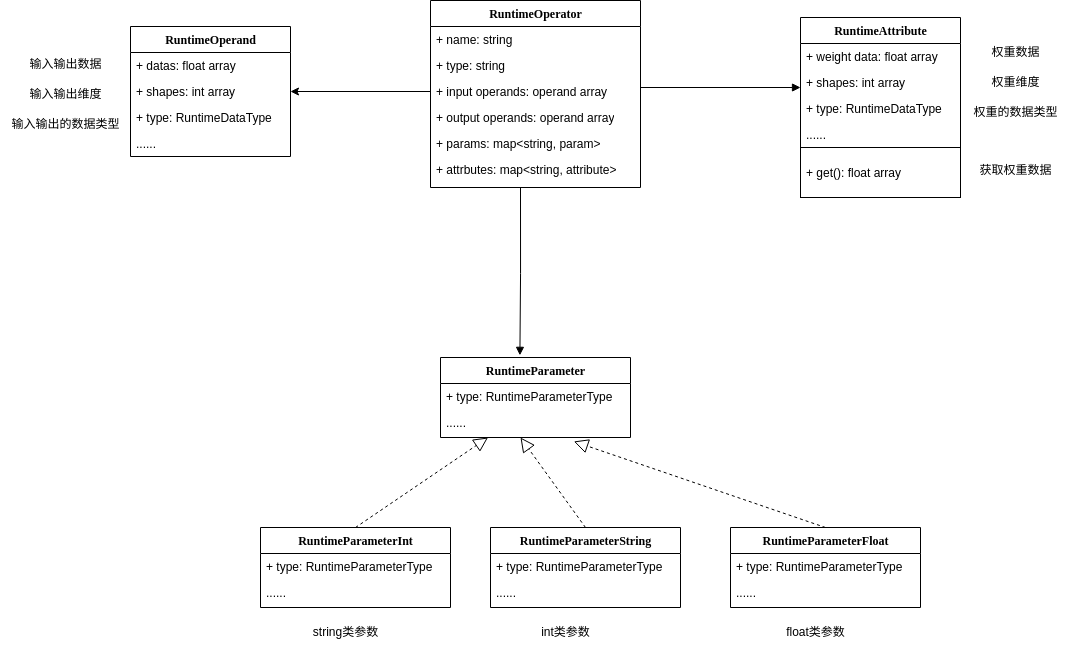
      • Feat: 在连续帧上用前层网络获取浅层特征,通过 attention 将当前帧前的浅层特征传播到当前帧来近似得到在当前帧上使用深层网络获取深层特征的效果。在分割任务上简单高效
    3. Mobile Video Object Detection with Temporally-Aware Feature Maps (CVPR2018)
      • Feat: 来自之前帧的 hidden state 当作 temperal information 增强当前帧的目标检测效果
    4. Low-Latency Video Semantic Segmentation (CVPR2018)
      • Feat: 视频语义分割 当前帧处理受之前帧中间特征影响,判断是否为关键帧,关键帧用高计算强度的模块处理

Idea

  1. 需要搞清楚 basicvsr++ 模型接受的输入是怎样的,模型的大致处理过程是怎样的? input example: torch.Size([1, 141, 3, 240, 320]) -> finish
  2. 需要搞清楚 test 加载数据计算指标的 pipeline? 成功, test 结果如下: -> finish
    1. orig: 07/11 20:25:27 - mmengine - INFO - Iter(test) [4/4] REDS4-BIx4-RGB/PSNR: 32.3965 REDS4-BIx4-RGB/SSIM: 0.9075 data_time: 13.1019 time: 57.3645
    2. curret_best: 07/12 17:36:58 - mmengine - INFO - Iter(test) [4/4] REDS4-BIx4-RGB/PSNR: 25.3909 REDS4-BIx4-RGB/SSIM: 0.6822 data_time: 12.9891 time: 64.2525
    3. current_now: 07/12 22:35:48 - mmengine - INFO - Iter(test) [4/4] REDS4-BIx4-RGB/PSNR: 25.3899 REDS4-BIx4-RGB/SSIM: 0.6821 data_time: 13.4293 time: 71.2697
    4. current_all:
      1. REDS4-BIx4-RGB/PSNR: 25.3908 REDS4-BIx4-RGB/SSIM: 0.6821
      2. Vimeo-90K-T-BDx4-Y/PSNR: 29.6901 Vimeo-90K-T-BDx4-Y/SSIM: 0.8333 Vimeo-90K-T-BIx4-Y/PSNR: 30.3137 Vimeo-90K-T-BIx4-Y/SSIM: 0.8437
      3. UDM10-BDx4-Y/PSNR: 30.7291 UDM10-BDx4-Y/SSIM: 0.8677
      4. VID4-BDx4-Y/PSNR: 22.9580 VID4-BDx4-Y/SSIM: 0.5820 VID4-BIx4-Y/PSNR: 23.2985 VID4-BIx4-Y/SSIM: 0.5998
  3. 如何降低量化时间,提升量化后效果? -> cease
    1. current: the calibration time is 16175.18998336792 s 约 4.5 h) 暂时无解
  4. EDVR 在 REDS 上测试? -> cease
    1. orig_0: 07/16 16:04:32 - mmengine - INFO - Iter(test) [400/400] REDS4-BIx4-RGB/PSNR: 24.7137 SSIM: 0.6305 data_time: 0.1508 time: 0.5635
    2. orig_1: 07/16 16:15:56 - mmengine - INFO - Iter(test) [400/400] REDS4-BIx4-RGB/PSNR: 23.5544 SSIM: 0.6249 data_time: 0.1505 time: 0.5589
    3. orig_2: 07/16 18:42:34 - mmengine - INFO - Iter(test) [400/400] REDS4-BIx4-RGB/PSNR: 23.8858 REDS4-BIx4-RGB/SSIM: 0.6057 data_time: 0.1552 time: 0.5929
  5. 转向在 VSR 小模型上测试量化算法的效果 -> cease
    1. 小的视频超分模型几乎都有各自的特点:有用剪枝的 有突出功耗低的 有用重参数化技巧的 种种已有特点不适合再叠加量化算法
  6. 转向在 SISR 模型上测试量化算法的效果 -> cease
  7. 尝试其它轻量化技巧,聚焦移动设备应用
    1. 结构重参数

Metrics

  1. PSNR
  2. SSIM
  3. Memory
  4. Latency

Results

Milestone_0

Rank Model Source Dataset PSNR SSIM Memory Latency

Milestone_1

PaperWriting

No.1

PaperReference